ArgoCD Integration Guide
Table of Contents
Introduction
The ArgoCD integration allows NudgeBee to connect with your ArgoCD GitOps platform, enabling intelligent monitoring, automated incident response, and seamless deployment management. This integration brings the power of AI-driven troubleshooting to your GitOps workflows.
What is ArgoCD Integration?
ArgoCD is a declarative, GitOps continuous delivery tool for Kubernetes. NudgeBee's ArgoCD integration provides:
- Real-time application health monitoring - Track sync status, deployment health, and configuration drift
- Automated incident correlation - Connect application issues with recent deployments
- AI-powered troubleshooting - Natural language queries to investigate and fix deployment problems
- Workflow automation - Incorporate ArgoCD operations into automated remediation workflows
Key Benefits
- Faster incident resolution - Automatically correlate application issues with recent deployments
- Intelligent troubleshooting - AI agent provides root cause analysis and actionable fixes
- Natural language control - Manage ArgoCD applications using conversational queries
- Automated deployment tracking - Every incident includes deployment history context
- GitOps visibility - Complete view of your deployment pipeline in NudgeBee
Prerequisites
Before configuring the ArgoCD integration, ensure you have:
Required Components
-
ArgoCD Server
- ArgoCD server installed and accessible
- Server URL (e.g.,
https://argocd.example.com) - Version: Compatible with ArgoCD CLI
-
Kubernetes Cluster Access
- NudgeBee deployed with access to Kubernetes cluster
- Ability to create Kubernetes secrets
-
Authentication Credentials
Choose one authentication method:
Option A: Auth Token (Recommended)
- ArgoCD authentication token
- Generate via:
argocd account generate-token
Option B: Username/Password
- ArgoCD username
- ArgoCD password
-
Permissions
- ArgoCD user must have read access to applications
- For automation workflows: write permissions for sync/rollback operations
Configuration Setup
Step 1: Create Kubernetes Secret
First, create a Kubernetes secret containing your ArgoCD credentials. This secret will be referenced by NudgeBee to authenticate with ArgoCD.
Using Auth Token (Recommended)
kubectl create secret generic argocd-credentials \
  --from-literal=ARGOCD_SERVER=https://argocd.example.com \
  --from-literal=ARGOCD_AUTH_TOKEN=your-auth-token-here \
  -n nudgebee
Using Username/Password
kubectl create secret generic argocd-credentials \
  --from-literal=ARGOCD_SERVER=https://argocd.example.com \
  --from-literal=ARGOCD_USERNAME=admin \
  --from-literal=ARGOCD_PASSWORD=your-password-here \
  -n nudgebee
Note: Replace nudgebee with the namespace where NudgeBee is deployed.
Step 2: Configure Integration in NudgeBee UI
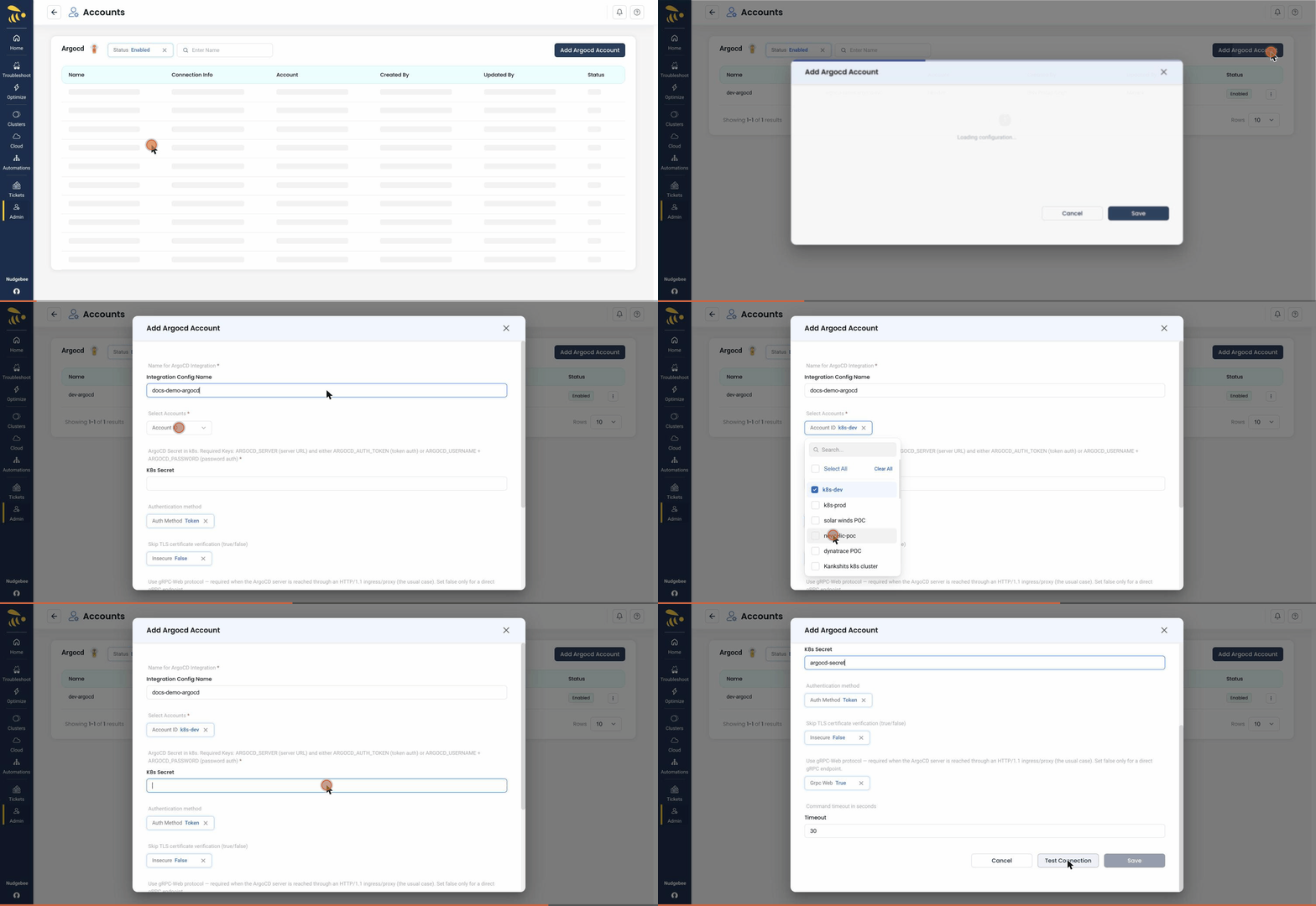
The walkthrough below shows the full flow — opening the CI/CD category, selecting ArgoCD, clicking Add ArgoCD Account, and filling in the configuration form.
-
Navigate to Integrations
- Go to Settings → Integrations
- Click on CI/CD category
- Select ArgoCD
-
Add ArgoCD Account
- Click "Add ArgoCD Account" button
- Fill in the configuration form:
Field Description Required Example Name Friendly name for this integration Yes Production ArgoCDServer URL ArgoCD server URL Yes https://argocd.example.comK8s Secret Kubernetes secret name created in Step 1 Yes argocd-credentialsServer Key in Secret Key name for server URL in secret No (default: ARGOCD_SERVER)ARGOCD_SERVERAuth Token Key in Secret Key name for auth token in secret No (default: ARGOCD_AUTH_TOKEN)ARGOCD_AUTH_TOKENUsername Key in Secret Key name for username (if using password auth) No (default: ARGOCD_USERNAME)ARGOCD_USERNAMEPassword Key in Secret Key name for password (if using password auth) No (default: ARGOCD_PASSWORD)ARGOCD_PASSWORDAuth Method Authentication method No (default: token)tokenorpasswordTimeout Command timeout in seconds No (default: 30) 30Insecure Skip TLS certificate verification No (default: false) trueorfalseAccounts Select cloud accounts to link this integration Yes Select from dropdown -
Test Configuration
- Click "Save" to test the connection
- NudgeBee will execute
argocd version --clientto validate connectivity - If successful, you'll see a success message
-
Verify Integration
- The integration should appear in the ArgoCD integrations list
- Status should show as "Active"
Step 3: Link to Cloud Accounts
Select which NudgeBee cloud accounts should use this ArgoCD integration. This allows deployment history to be automatically correlated with incidents in those accounts.
Features & Capabilities
1. AI-Powered ArgoCD Agent
The ArgoCD Agent is an intelligent GitOps incident responder that provides:
- Natural language queries - Ask questions like "Check health of my-app" or "Why is my-app failing?"
- Automated troubleshooting - Follows systematic investigation protocols for common issues
- Multi-tool correlation - Combines data from ArgoCD, Kubernetes, GitHub, logs, and metrics
- Actionable fixes - Provides specific commands to resolve issues
- Emergency response - Quick rollback and recovery procedures
Access the Agent:
- Via chat interface: Ask questions about ArgoCD applications
- Via incidents: Automatically triggered during investigations
- Via workflows: Use as a tool in automated workflows
2. Automated Deployment History
For every incident in NudgeBee, deployment history is automatically retrieved if:
- The affected service has an
argocd.argoproj.io/instancelabel - ArgoCD integration is configured for the account
- The service is not from AWS CloudWatch alarms
What's Included:
- Current application sync and health status
- Recent deployment history with timestamps
- Git commit information (repo, branch, revision)
- Deployment correlation with incident timeline
- Insights about deployment timing relative to the incident
3. Playbook Actions
The ArgoCD integration includes playbook actions that can be executed:
Available Actions:
- Get ArgoCD Application History - Retrieves deployment details and status
- Inputs:
application_name,account_id(optional),integration_name(optional) - Outputs: Sync status, health status, deployment history, insights
- Inputs:
Auto-Execution:
- Automatically runs for Kubernetes incidents when ArgoCD labels are detected
- Adds deployment context to incident investigation
- Skips for AWS CloudWatch alarms (infrastructure-only alerts)
4. LLM Tool Integration
Execute ArgoCD CLI commands via the AI agent:
Supported Commands:
argocd app list- List all applicationsargocd app get <name>- Get application detailsargocd app sync <name>- Sync an applicationargocd app diff <name>- Show differences between Git and clusterargocd app history <name>- View deployment historyargocd app logs <name>- View application logsargocd app rollback <name>- Rollback to previous versionargocd proj list- List projectsargocd cluster list- List clustersargocd repo list- List repositories
Enhanced Error Handling: The tool provides user-friendly error messages for common issues:
- Authentication failures → Check credentials
- Authorization errors → Verify permissions
- Connection issues → Check server URL and network
- TLS errors → Consider using
--insecureflag - Application not found → Verify application name
5. Workflow Integration
ArgoCD operations can be incorporated into automated workflows:
Task Type: cicd.argocd.cli
Use Cases:
- Automated deployment on event triggers
- Rollback automation on health degradation
- Sync applications on schedule
- Multi-environment promotion workflows