Redis
Connect a Redis instance so NudgeBee can inspect its state and run commands against it from workflows. Redis is listed under In-Memory in the integrations catalog.
Supported: Redis 5 and later.
When Do You Need This?
This integration is optional. Connect Redis when you want to:
- Inspect memory usage, key counts, eviction and client state while troubleshooting a service that depends on the cache.
- Run Redis commands from an automation using the
dbms.redis.clitask — for example clearing a poisoned key as a remediation step, or readingINFO memoryas evidence in a runbook.
Step 1: Open the Configuration Form
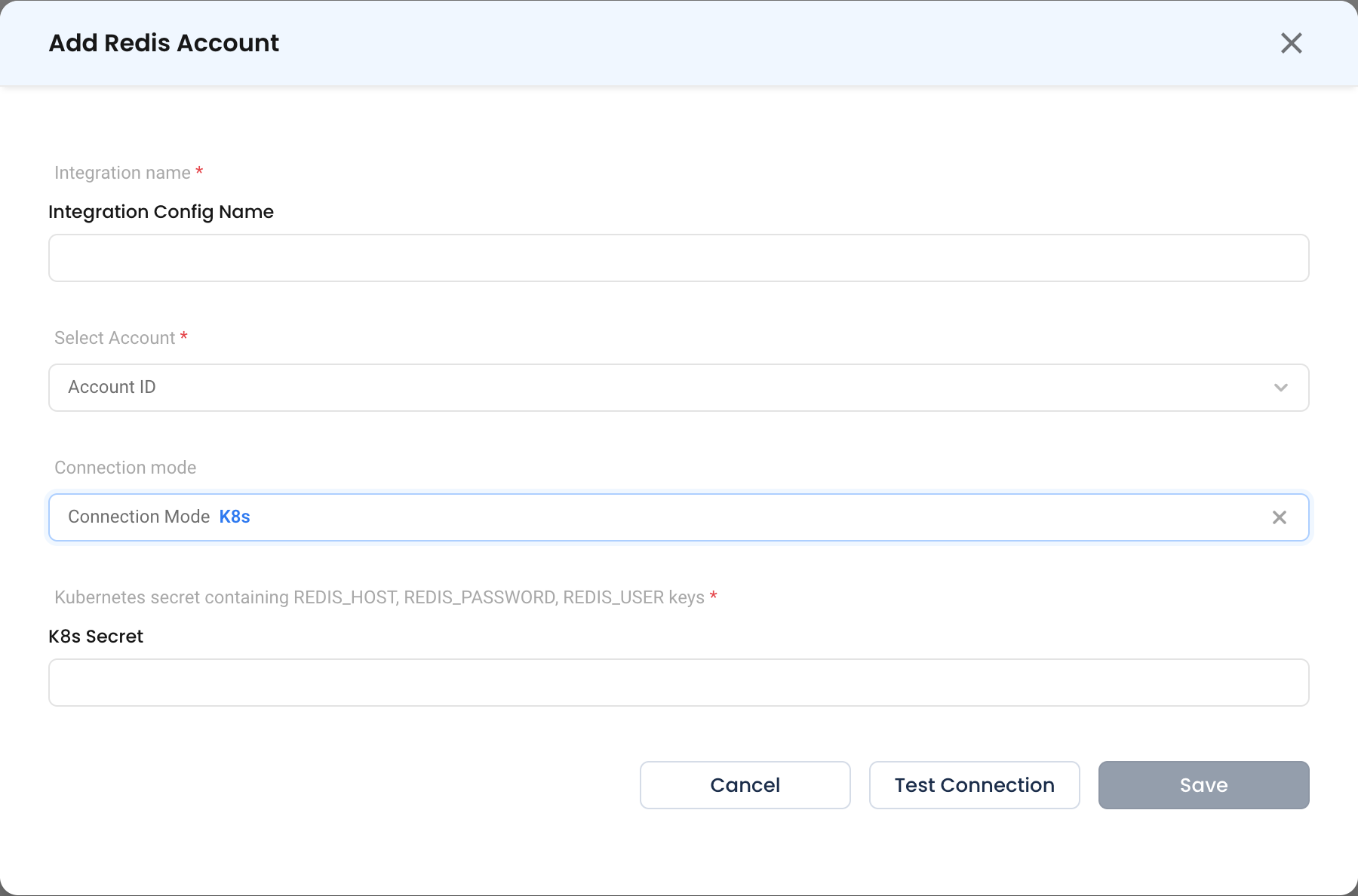
Navigate to Admin > Integrations > In-Memory and select Redis, then click Add Redis Account.

- Integration name * (Required) — How this instance is identified elsewhere in NudgeBee, e.g.
session-cache-prod. - Select Account * (Required) — The NudgeBee account this connection belongs to.
Step 2: Choose a Connection Mode
K8s
The agent connects from inside the cluster using credentials held in a Kubernetes Secret.
- Kubernetes secret containing REDIS_HOST, REDIS_PASSWORD, REDIS_USER keys * (Required)
| Key | Value |
|---|---|
REDIS_HOST | Hostname or service DNS name, e.g. redis-master.cache.svc.cluster.local |
REDIS_USER | ACL username. Use default on instances without ACLs. |
REDIS_PASSWORD | Password |
kubectl create secret generic nudgebee-redis \
  --namespace cache \
  --from-literal=REDIS_HOST=redis-master.cache.svc.cluster.local \
  --from-literal=REDIS_USER=default \
  --from-literal=REDIS_PASSWORD='<YOUR_PASSWORD>'
Proxy Agent
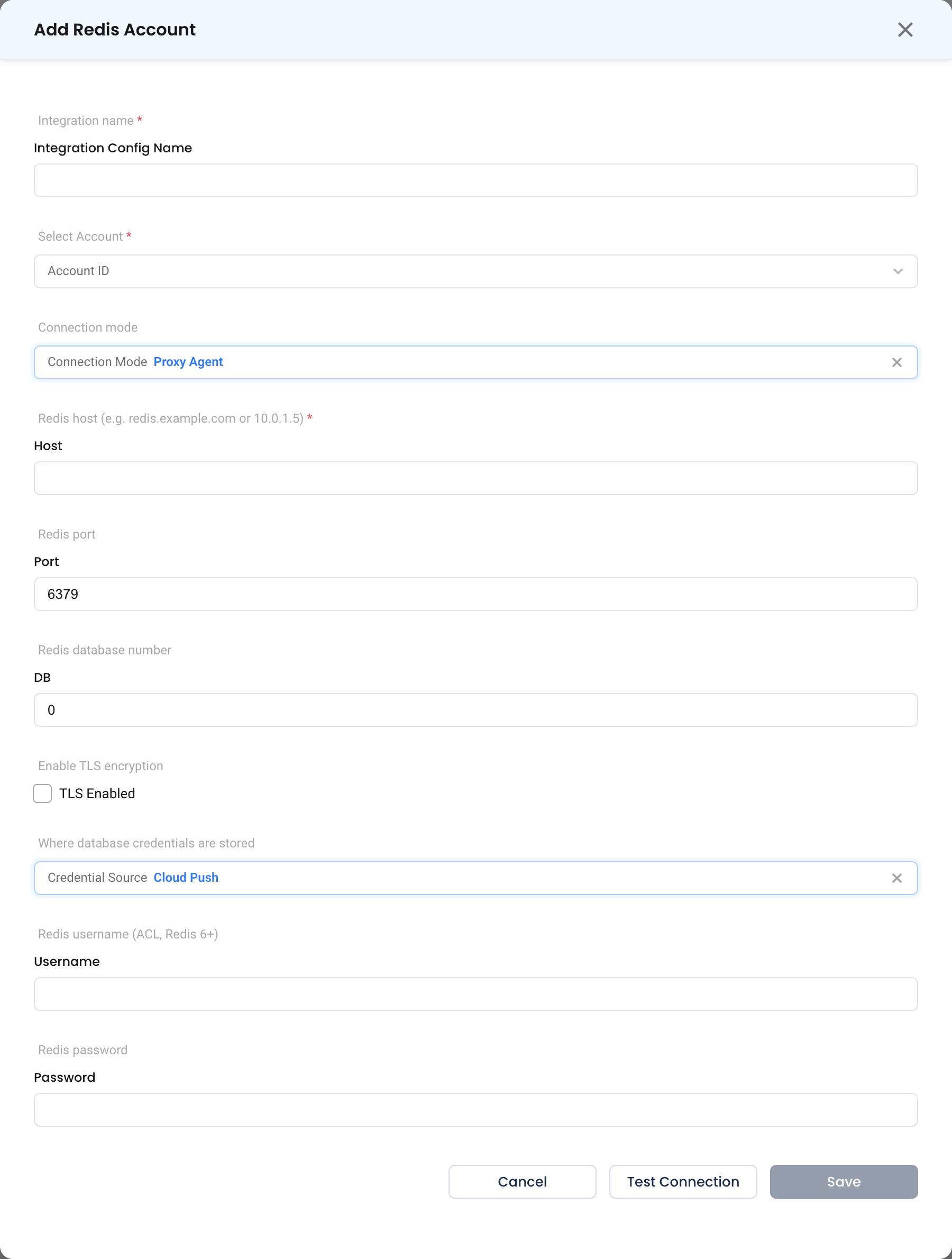
The Proxy Agent (Forager) connects over the network. Use this for ElastiCache, Memorystore, Azure Cache for Redis, or any instance outside a connected cluster.
- Redis host * (Required) — Hostname or IP, e.g.
redis.example.comor10.0.1.5. - Redis port — Typically
6379. - DB — Redis database number. Leave empty for
0. - TLS Enabled — Turn on for managed services and anything crossing a network boundary.
- Credential Source —
Cloud Push(default),AWS Sm,Gcp Sm,Azure KvorLocal. See credential sources. - Username — ACL username, Redis 6 and later. Leave empty on older instances.
- Password — Optional if the instance has no password set.
Step 3: Test and Save
Click Test Connection, then Save.
Automatically Discovered Instances
Redis running inside a connected cluster may be registered automatically by the NudgeBee agent. Those entries appear in the list with agent as the creator.
Verify the Integration
- Click Test Connection on the form — it should succeed before you save.
- In a workflow, run a
dbms.redis.clitask with the commandPING. The output should bePONG. - Try
INFO memoryto confirm the user can read server statistics.
Troubleshooting
| Symptom | Likely Cause | Fix |
|---|---|---|
NOAUTH Authentication required | No password supplied | Set the password, or REDIS_PASSWORD in the secret. |
WRONGPASS invalid username-password pair | ACL username is wrong | On instances without ACLs the username is default. |
ERR unknown command 'AUTH' with a username | Username sent to a Redis older than 6 | Leave Username empty for Redis 5. |
| Connection resets on a managed service | TLS required | Turn on TLS Enabled. |
| Commands are rejected | The ACL restricts the command set | Grant the NudgeBee user the commands your workflows use, or a read-only ACL such as +@read +info. |
| Reads return nothing on a cluster | Connected to a replica or the wrong shard | Point the connection at the primary endpoint. |