SSH
Connect SSH credentials so workflows can run commands on Linux and Windows servers — VMs, bare metal, or anything outside Kubernetes. SSH is listed under Servers in the integrations catalog.
When Do You Need This?
This integration is optional. Connect SSH when an automation needs to reach a host directly:
integrations.ssh— run a command on a remote server and capture its output.script.runwithexecutor_type: ssh— run a Bash, Python, JavaScript or PowerShell script on the host.
This is not what the Kubernetes Execute Bash runbook action uses — that runs inside the cluster in an ephemeral container or dedicated pod, and needs no SSH integration.
Prerequisites
- A user on the target hosts that NudgeBee can authenticate as, with only the privileges the automations need. Key-based authentication is strongly preferred over passwords.
- For Proxy Agent mode, a Proxy Agent (Forager) with network access to the hosts.
Step 1: Open the Configuration Form
Navigate to Admin > Integrations > Servers and select SSH, then click Add SSH Account.

- Name of Ssh * (Required) — How this credential is identified when selecting an integration in a task, e.g.
billing-vms. - Select Account * (Required) — The NudgeBee account this belongs to.
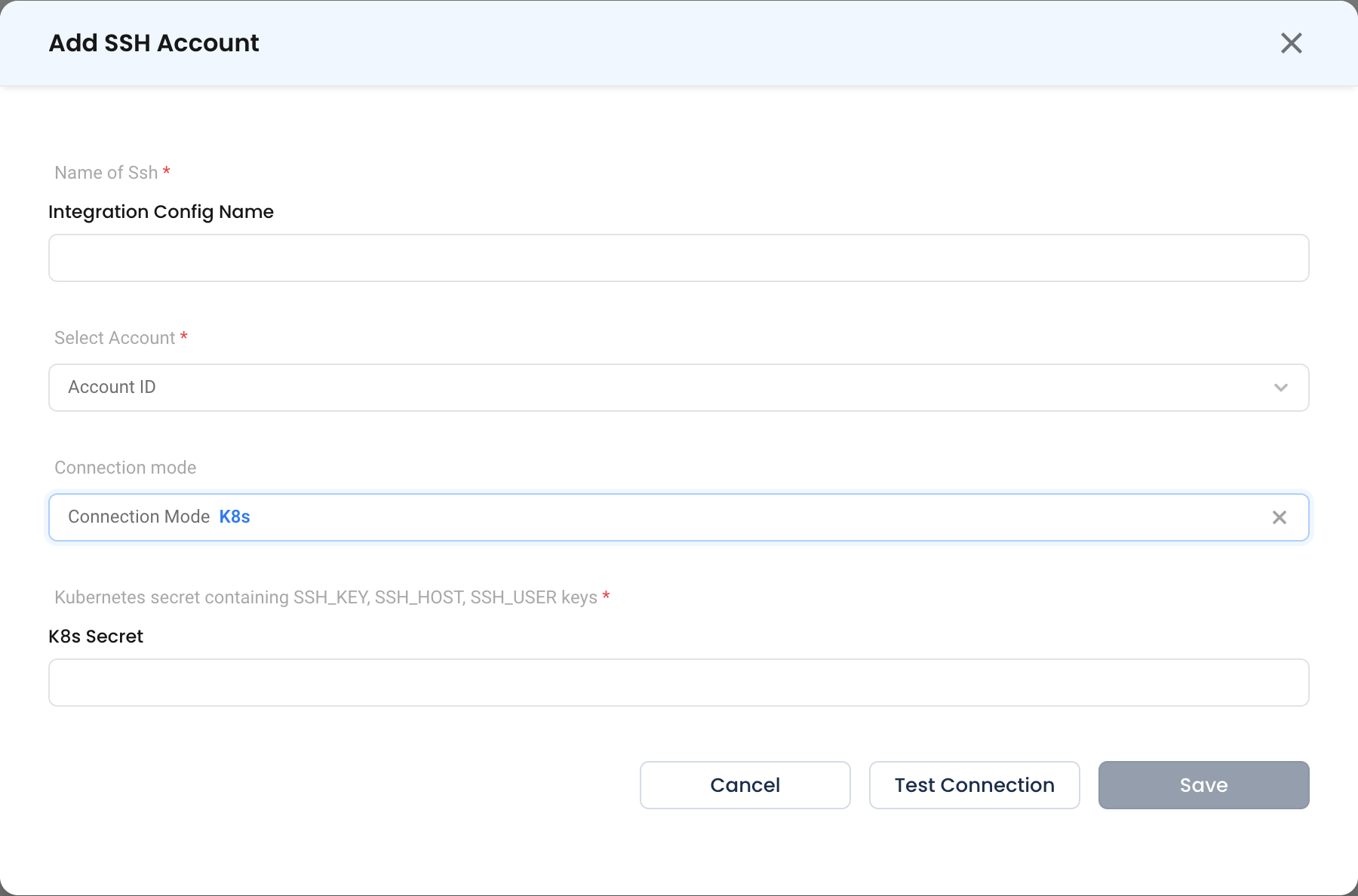
Step 2: Choose a Connection Mode
K8s
The agent connects from inside a cluster using a Kubernetes Secret.
- Kubernetes secret containing SSH_KEY, SSH_HOST, SSH_USER keys * (Required)
| Key | Value |
|---|---|
SSH_HOST | Hostname or IP of the target server |
SSH_USER | Username to log in as |
SSH_KEY | Private key in PEM format |
kubectl create secret generic nudgebee-ssh \
  --namespace nudgebee-agent \
  --from-literal=SSH_HOST=10.0.1.20 \
  --from-literal=SSH_USER=nudgebee \
  --from-file=SSH_KEY=./id_ed25519
Proxy Agent
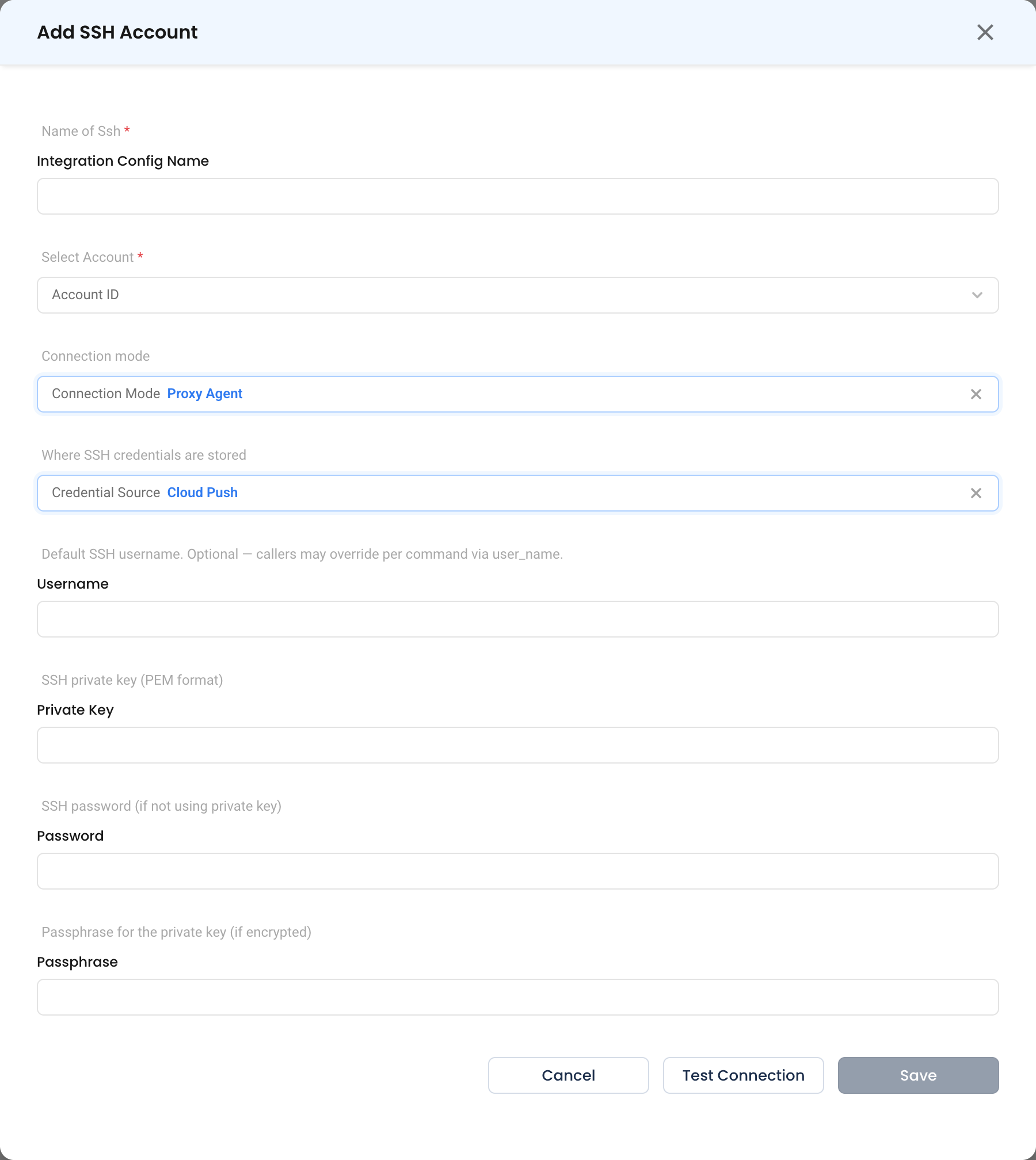
Forager opens the SSH connection. Credentials are configured here; which hosts may be reached is configured on the agent, not in this form — either a fixed host on the datasource, or allowed_hosts for dynamic mode, where NudgeBee supplies the target host at request time. See SSH datasource notes.
- Credential Source —
Cloud Push(default),AWS Sm,Gcp Sm,Azure KvorLocal. See credential sources. - Username — Default login user. Optional; a task may override it per command with
user_name. - Private Key — The private key in PEM format. Preferred over a password.
- Password — Used only when not authenticating with a key.
- Passphrase — Required if the private key is encrypted.
Step 3: Test and Save
Click Test Connection, then Save.
Security Notes
- Give the SSH user the narrowest account that still lets the automations work, and prefer a dedicated key per integration so it can be revoked without affecting anyone else.
- In dynamic mode,
allowed_hostsis the boundary on what NudgeBee can reach. Keep it to the CIDR ranges or hostnames the automations actually need. - Forager verifies the server host key when the datasource sets
known_hostsorhost_key. Configure one of them for anything reachable outside a trusted network — see SSH datasource notes.
Verify the Integration
- Click Test Connection on the form — it should succeed before you save.
- In a workflow, run an
integrations.sshtask with a harmless command such ashostnameoruptime, and confirm the output is what you expect.
Troubleshooting
| Symptom | Likely Cause | Fix |
|---|---|---|
permission denied (publickey) | The public key is not in the user's authorized_keys | Add the matching public key on the target host. |
| Key is rejected but works elsewhere | Key supplied in the wrong format | The private key must be PEM. Convert with ssh-keygen -p -m PEM -f <keyfile>. |
| Authentication fails on an encrypted key | Missing passphrase | Set Passphrase, or use an unencrypted key dedicated to NudgeBee. |
| Host key verification failed | known_hosts or host_key does not match the server | Update the agent's configured host key. Do not disable verification. |
| Connection refused for one host but not others | The host is outside allowed_hosts | Add its address or CIDR range to the datasource's allowed_hosts. |
| Commands run as the wrong user | The task overrode the default | Check user_name on the task; it takes precedence over Username. |