Apache Hive
Connect Apache Hive so NudgeBee can query logs stored in a Hive table. Hive is a log-only source.
caution
For this integration to work correctly, the Hive table must be partitioned by time (year / month / day / hour), and your filter must include at least one of those partition columns. Without partition pruning, Hive scans the entire table — queries are slow and may fail outright on malformed rows.
Prerequisites
- A HiveServer2 endpoint reachable from NudgeBee, in
host:portform, e.g.hiveserver2.hive.svc.cluster.local:10000. - A Hive table holding log data, partitioned by time.
- The column names for the log timestamp and the log message body.
Step 1: Configure the Integration in NudgeBee
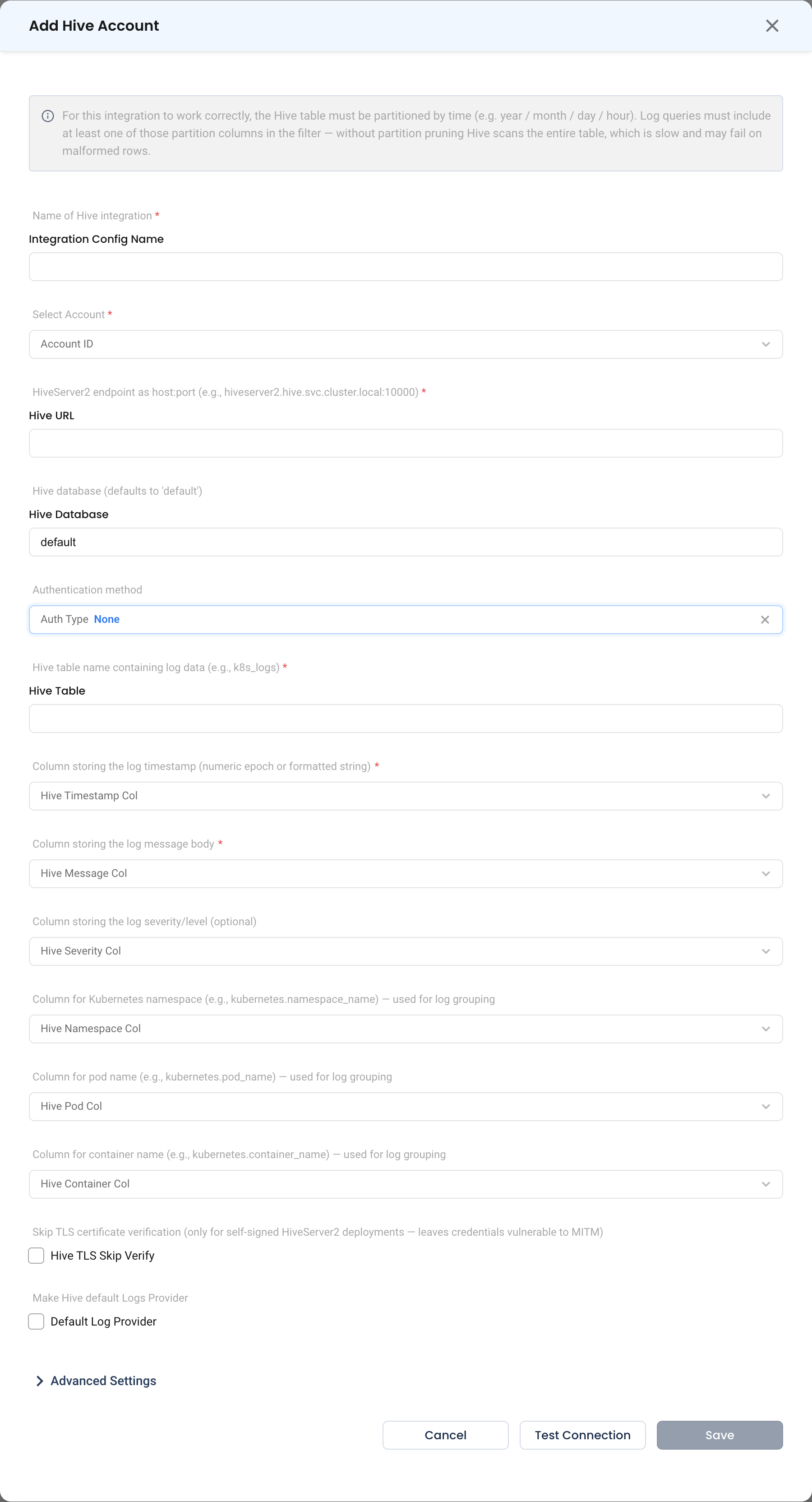
Navigate to Admin > Integrations > Observability, select Apache Hive, then click Add Hive Account.

- Integration Config Name * (Required) — a name for this Hive integration, e.g.
app-logs-hive. - Account ID * (Required) — the NudgeBee account to link.
- Hive URL * (Required) — the HiveServer2 endpoint as host and port, e.g.
hiveserver2.hive.svc:10000. - Hive Database — the database to connect to. Defaults to
default. - Auth Type — the authentication method. Defaults to
None. - Hive Table * (Required) — the table containing log data, e.g.
logs.app_logs. - Hive Timestamp Col * (Required) — the column storing the log timestamp, as a numeric epoch or a formatted string.
- The column storing the log message body is also required.
Step 2: Test and Save
Click Test Connection, then Save.
Verify the Integration
- Click Test Connection on the form — it should succeed before you save.
- Open Clusters, select a cluster, and go to Monitoring > Logs > Query Log.
- Confirm log rows from Hive appear. Include a time range so partition pruning applies.
Troubleshooting
| Symptom | Likely Cause | Fix |
|---|---|---|
| Queries are very slow or time out | The filter does not include a partition column | Ensure the table is partitioned by time and that queries include the partition column. |
| Query fails on some rows | Malformed rows in the table | Hive scans without pruning will surface bad rows; fix the source data or narrow the partition range. |
| Connection refused | Wrong HiveServer2 port | HiveServer2 usually listens on 10000; confirm the port your deployment uses. |
| No results despite data existing | Wrong timestamp column, or a format mismatch | Confirm Hive Timestamp Col and whether it stores epoch values or formatted strings. |
| Authentication errors | Auth Type does not match the server | Set the authentication method your HiveServer2 requires. |