LLM Gateway
The LLM Gateway integration stores a single provider credential and exposes it to NudgeBee's AI features through one endpoint. Where the BYOM provider pages configure a model for the whole deployment via Helm values, a Gateway account is created in the UI and can hold several credentials side by side — one per provider, team or environment.
When Do You Need This?
Use the Gateway when you want to:
- Keep more than one provider credential active at once, e.g. an OpenAI key for one team and a self-hosted endpoint for another.
- Point NudgeBee at a self-hosted or OpenAI-compatible endpoint — vLLM, Ollama behind a gateway, or any server that speaks the OpenAI API.
- Expose your own model names to NudgeBee while mapping them to whatever ids the provider actually expects.
Step 1: Configure the Integration in NudgeBee
Navigate to Admin > Integrations > LLM, select LLM Gateway, then click Add LLM Gateway Account.

- Integration Config Name * (Required)
- A name identifying this config, e.g.
qwen-hforteam-openai.
- A name identifying this config, e.g.
- Provider * (Required)
- Which provider this credential is for. One of:
Openai,Anthropic,Gemini,Vertex,Vertex Openai,Bedrock,Custom. - Choose Custom for a self-hosted or OpenAI-compatible endpoint.
- Choose Vertex Openai for Vertex AI's OpenAI-compatible Model Garden / MaaS endpoint.
- Which provider this credential is for. One of:
- API Key
- The provider's API key. Required for OpenAI, Anthropic and Gemini; optional for a keyless custom server.
- Base URL (Custom and OpenAI-compatible providers)
- The OpenAI-compatible base URL of the endpoint. A trailing
/v1is optional — bothhttps://<host>andhttps://<host>/v1work. - Must be https and publicly reachable.
- The OpenAI-compatible base URL of the endpoint. A trailing
- Model mappings
- Pairs of Client model name (what NudgeBee asks for) and Served model (the exact id sent to the provider). Add as many as you need.
- Mappings are additive: models not listed here remain available through provider-qualified names.
- Custom and Vertex OpenAI-compatible endpoints must list the models they serve — there is no discovery for these.
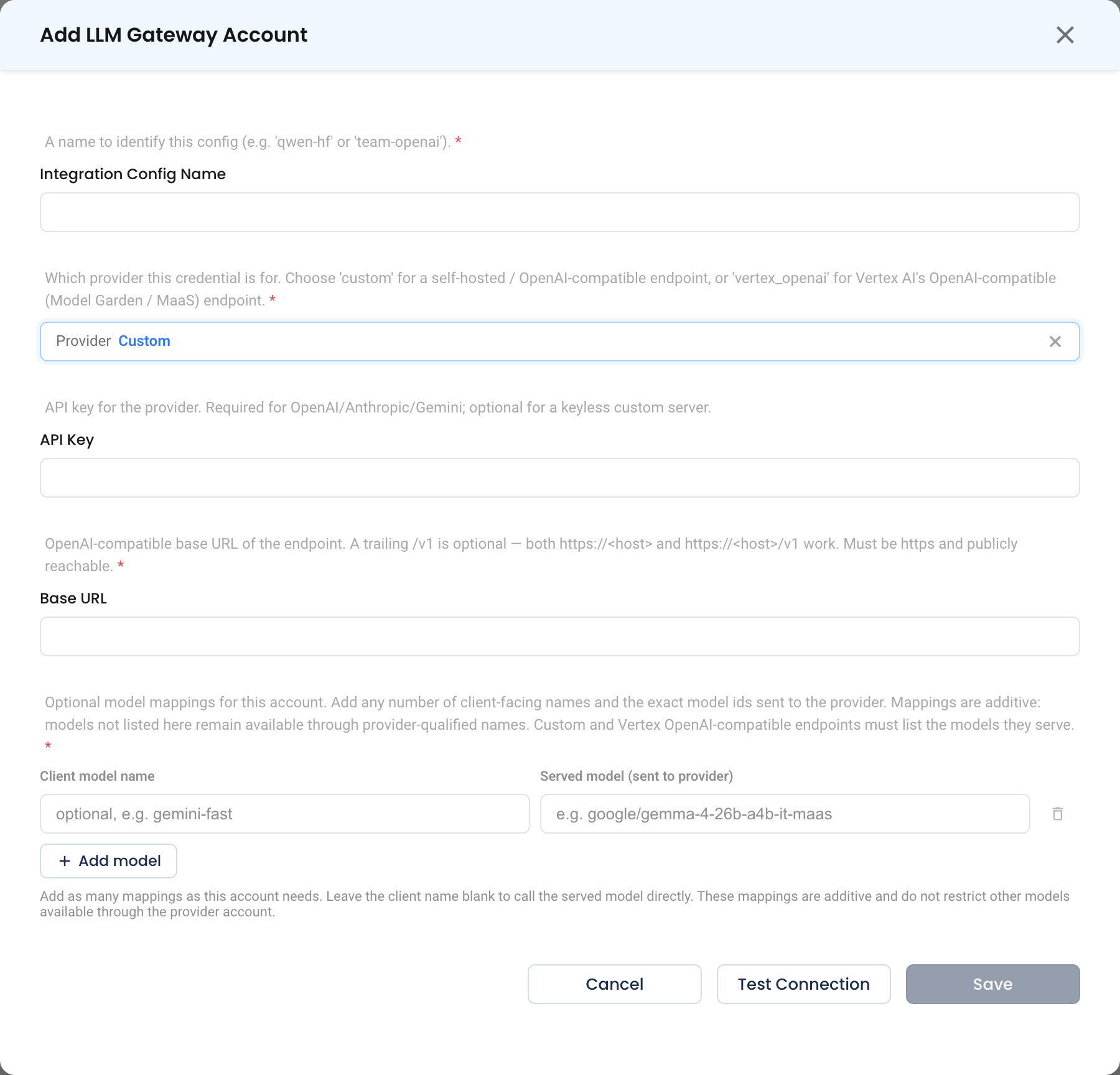
Step 2: Test and Save
Click Test Connection, then Save.
Choosing Between Gateway and BYOM
| LLM Gateway | BYOM provider config | |
|---|---|---|
| Configured in | The UI, per account | Helm values (nudgebee_secret) |
| Number of credentials | Several, side by side | One provider for the deployment |
| Model naming | Client-facing names you define | Provider model ids |
| Best for | Multiple teams, providers or endpoints | A single deployment-wide model |
Both feed the same AI features — NuBi, troubleshooting, RCA and agentic automation.
Verify the Integration
- Click Test Connection on the form — it should succeed before you save.
- Ask NuBi a question and confirm it answers. If you configured model mappings, request one of your client-facing model names.
Troubleshooting
| Symptom | Likely Cause | Fix |
|---|---|---|
| Connection test fails on a custom endpoint | Base URL is not https, or not publicly reachable | The endpoint must be https and reachable from NudgeBee. Use the Proxy Agent for private endpoints. |
| Model not found | A custom or Vertex OpenAI endpoint with no mapping for that model | Custom and Vertex OpenAI-compatible endpoints must declare every model they serve in the mappings. |
401 from the provider | Missing or wrong API key | OpenAI, Anthropic and Gemini all require a key; only keyless custom servers may omit it. |
| Requests go to the wrong model | A mapping shadows the intended id | Check the client-name to served-model pairs; mappings are additive, so an unmapped model is still reachable by its provider-qualified name. |
Trailing /v1 confusion | — | Not a problem: both https://<host> and https://<host>/v1 are accepted. |