Automation Webhook
The Automation Webhook turns any system that can send an HTTP request into a trigger for a NudgeBee workflow. CI pipelines, deployment tools, internal scripts, ticketing systems and provider alerting can all start an automation this way, and the request body is available to every task in the run.
In saved workflow JSON this integration type appears as workflow_webhook.
How It Works
External system (CI, script, alerting tool)
        │
        ▼
HTTP POST to the generated webhook URL
        │
        ▼
NudgeBee matches the URL to a workflow_webhook integration
        │
        ├── Evaluates the trigger's filter expression (if set)
        └── Starts the linked workflow, exposing the body as webhook_payload
Step 1: Create the Integration
You can create it up front, or let the workflow editor create it for you.
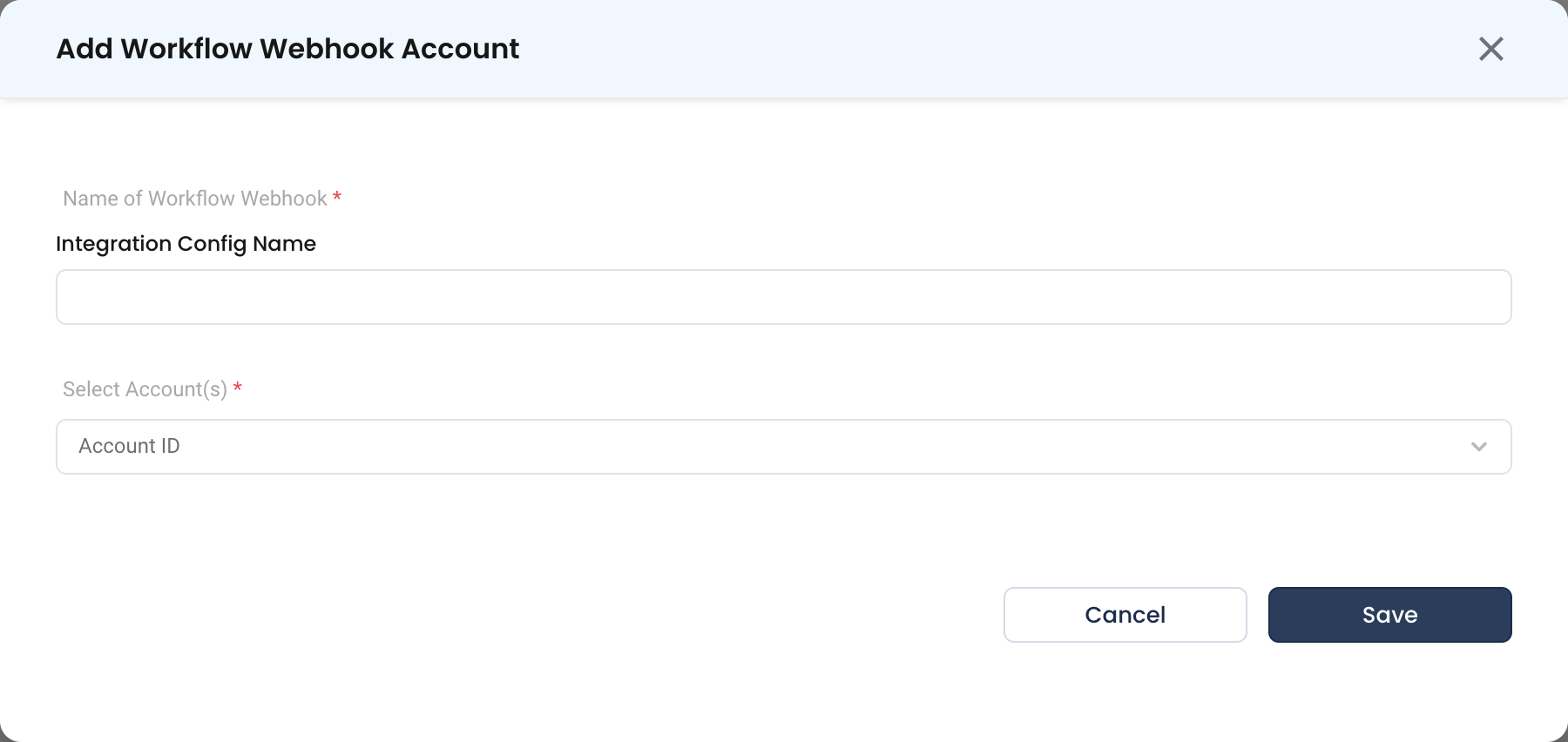
From the integrations page — Navigate to Admin > Integrations > Webhooks, select Automation Webhook, then click Add Workflow Webhook Account.
- Name of Workflow Webhook * (Required)
- The integration name, also used by the workflow's trigger. Must match
^[a-zA-Z0-9._-]+$— letters, numbers, dots, hyphens and underscores only, maximum 200 characters. - Name it after the source system, e.g.
github_ci_webhookorjira-service-desk-wb.
- The integration name, also used by the workflow's trigger. Must match
- Select Account(s) * (Required)
- One or more NudgeBee accounts this webhook serves. Selecting several lets a single endpoint fan out across clusters.
From the workflow editor — Add a Webhook trigger to a workflow and enter an integration name in the sidebar. NudgeBee creates the integration for you, named wf-<workflow-id>-<name>.
Step 2: Copy the Webhook URL
The URL is generated once the integration is linked to a workflow, and is shown in that workflow's Webhook trigger configuration — click the copy icon beside it. There is no URL to copy on the integrations page itself, because the endpoint is bound to the workflow, not to the integration alone.
Step 3: Configure the Sender
Point your external system at the copied URL with an HTTP POST and a JSON body. Any JSON shape is accepted; NudgeBee does not require a schema.
Step 4: Filter Which Requests Run the Workflow
A webhook that fires on every request usually runs too often. Set a Filter Expression on the trigger — a template expression evaluated against the request body, which runs the workflow only when it renders to true or 1. The body is available as webhook_payload, and the expression is limited to 500 characters.
| Expression | Behavior |
|---|---|
{{ webhook_payload.action == "opened" }} | Only when the payload's action is opened |
{{ webhook_payload.repository.name == "my-repo" }} | Only for a specific repository |
{{ webhook_payload.status == "failure" }} | Only for failed CI runs |
See workflow triggers for the full trigger reference.
Using the Payload in Tasks
The request body is exposed to the run as webhook_payload, so tasks can read fields from it directly — for example {{ webhook_payload.repository.full_name }} in a notification task, or as an input to a ticket task. See templating for expression syntax.
Verify the Integration
-
Save the workflow with its Webhook trigger linked, so the URL is generated.
-
Send a test request from your machine or the sending system:
curl -X POST '<generated-webhook-url>' \
  -H 'Content-Type: application/json' \
-d '{"action":"opened","repository":{"name":"my-repo"}}' -
Open the workflow's run history. A run should appear within a few seconds.
-
Open the run and confirm the tasks that read
webhook_payloadreceived the fields you sent.
Test with the filter expression removed first. If the run appears without a filter and not with one, the expression is the problem, not the endpoint.
Troubleshooting
| Symptom | Likely Cause | Fix |
|---|---|---|
| No webhook URL is shown | The integration is not linked to a workflow yet | Save the workflow with the integration selected in its Webhook trigger; the URL appears afterwards. |
| Request accepted, workflow never runs | The filter expression did not render true | Remove the filter and retry. Then check the expression against the payload you actually send — a missing key renders empty, not true. |
| Integration name is rejected | Name contains a space or another disallowed character | Use only letters, numbers, dots, hyphens and underscores, up to 200 characters. |
Tasks see an empty webhook_payload | The request had no JSON body, or the wrong content type | Send Content-Type: application/json with a JSON object body. |
| Workflow runs twice per event | Two integrations, or two workflows, are bound to the same sender | Check whether the workflow editor auto-created a wf-... integration alongside one you made yourself, and disable the one you do not want. |
| Requests never arrive | The NudgeBee URL is not reachable from the sender | Confirm the endpoint is reachable from the sending system's network. |