Troubleshooting
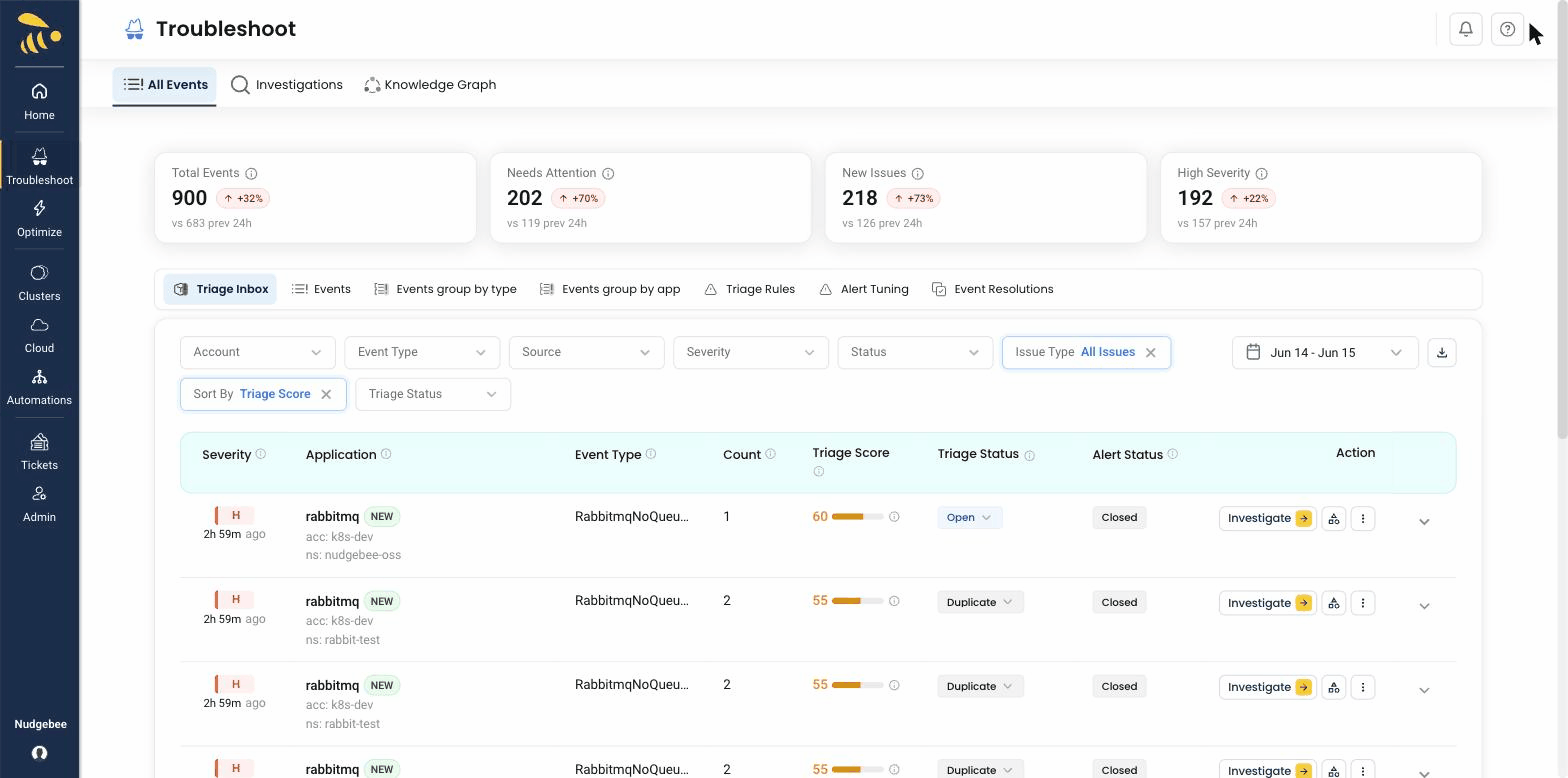
NudgeBee's troubleshooting dashboard gives you a real-time view of events, errors, and anomalies across all your connected Kubernetes clusters. Instead of switching between multiple monitoring tools, you get a single pane of glass — powered by the Semantic Knowledge Graph — that correlates metrics, logs, traces, and code to help you find the root cause of issues faster, reducing MTTR from hours to minutes.
What You Can Do Here
- Monitor real-time events — See pod crashes, OOM kills, deployment failures, and other Kubernetes events as they happen.
- AI-powered root cause analysis with NuBi — When an LLM is connected, NuBi (the SRE AI Agent) and NudgeBee's pre-built AI agents automatically analyze incidents, correlate signals across the Semantic Knowledge Graph, and suggest root causes in plain language.
- Explore the Semantic Knowledge Graph — Visualize your infrastructure dependencies and trace how issues propagate across services. See Semantic Knowledge Graph.
- Configure alerting rules — Set up custom alerting rules to get notified when specific conditions are met. See Alerting.
- Attach event playbooks — Run evidence-collection actions (logs, metrics, custom SQL, kubectl, cloud CLI, SSH, …) automatically on each event so the LLM has the data it needs. See Playbook Catalog.
- Understand the split between playbooks and workflows — Playbooks gather evidence for the LLM; workflows post-process the resulting event (triage, ticketing, remediation). See Event Playbooks vs Workflows.
To use troubleshooting features, you need at least one Kubernetes cluster connected and an observability source integrated. For AI-powered analysis, an LLM connection is also needed.
How NuBi Investigates Incidents
NuBi does not simply summarize alerts — it performs multi-hop reasoning over the Semantic Knowledge Graph (SKG) to find the true root cause:
- Topology Traversal: Navigates from the failing entity upstream and downstream across Kubernetes objects, namespaces, and cloud dependencies.
- Evidence Collection: Queries Prometheus metrics for resource spikes, fetches pod stdout/stderr logs around the timestamp, and inspects recent Kubernetes events.
- Change & Config Correlation: Cross-references recent CI/CD deployments, git commits, ConfigMap changes, and Secret references.
- Causality Synthesis: Forms a structured 5-Whys explanation backed by exact timestamps, log snippets, and trace IDs.
Execution Guardrails & Human-in-the-Loop
NudgeBee is designed with strict enterprise safety controls:
- Default Mode (Human-in-the-Loop): NuBi produces diagnostic conclusions and generates exact remediation commands (e.g.
kubectl patch, rollback commands, or secret creations). NuBi never runs destructive commands automatically without explicit human one-click approval in the UI or Slack. - Autopilot Mode (Policy-Gated): If you enable Autopilot, safe non-destructive operations (such as pod restarts, vertical right-sizing, or node drains) can be executed automatically according to rules and schedules you define.
- Audit Logging: Every action proposed, approved, or executed is logged with user attribution for compliance.
Sample Incident Walkthrough: CrashLoopBackOff
Here is an end-to-end example of NuBi diagnosing an outage caused by a missing database secret:
[Incident Alert] Pod auth-service-78d49fb99-x7k2q is CrashLoopBackOff in namespace production
1. Evidence Collected by NuBi
- K8s Event:
Warning BackOff Back-off 5m0s restarting failed container auth-app - Pod Container Log:
FATAL: Failed to read DB_PASSWORD from environment variable: Secret "auth-db-secret" not found - Recent Change: Helm upgrade
auth-servicereleasev2.4.1deployed 4 minutes ago with a new secret key reference.
2. NuBi's Reasoning Output
Root Cause: The
auth-servicedeployment was upgraded tov2.4.1which introduced a reference to Secretauth-db-secret, but the secret was not created in theproductionnamespace prior to deployment.Recommended Fix:
kubectl create secret generic auth-db-secret \
  --from-literal=DB_PASSWORD="<PROD_PASSWORD>" \
  -n production
3. Action
Click Apply Fix in the UI to create the secret, or click Create Jira Ticket to assign it to the on-call team with the full investigation payload attached.
Watch a Walkthrough
What You Will Find in This Section
- Event Playbooks vs Workflows — Conceptual guide to the two automation surfaces and when to use each.
- Alerting — Configure custom alerting rules and attach playbook actions for auto-triage.
- Playbook Catalog — Full reference of every event-playbook action and its parameters, including custom data-collection (proxy DB query, cloud CLI, SSH, kubectl).
- Templating & Best Practices — Use gonja (Jinja-style) templates in action parameters, with patterns for labels, outputs, conditionals, and
for_eachloops.