MySQL
Connect a MySQL or MariaDB database so NudgeBee can analyse its health and query it from workflows.
Supported: MySQL 5.7 and later, and MariaDB.
Prerequisites
- A MySQL user NudgeBee can authenticate as, with read access to the schemas you want analysed.
- Either the NudgeBee agent running in the same cluster as the database (K8s mode), or a reachable Proxy Agent (Proxy Agent mode).
Recommended Grants
CREATE USER 'nudgebee'@'%' IDENTIFIED BY '<YOUR_PASSWORD>';
GRANT SELECT ON <your_database>.* TO 'nudgebee'@'%';
GRANT PROCESS ON *.* TO 'nudgebee'@'%';
SELECT covers the application tables NudgeBee reads and the information_schema.columns lookups it runs before querying an unfamiliar table.
PROCESS covers everything NudgeBee reads for diagnostics: it is what lets NudgeBee see other sessions in SHOW PROCESSLIST and information_schema.processlist — without it, only the NudgeBee session is visible and concurrency analysis is meaningless — and it is also required for SHOW ENGINE INNODB STATUS, which is how lock and transaction state is read.
Nothing else is needed. In particular, NudgeBee does not read performance_schema and does not run any replication statement, so neither a performance_schema grant nor REPLICATION CLIENT is required.
Step 1: Open the Configuration Form
Navigate to Admin > Integrations > Databases and select Mysql, then click Add Mysql Account.

Step 2: Choose a Connection Mode
K8s
- Kubernetes secret containing MYSQL_DATABASE, MYSQL_HOST, MYSQL_USER, MYSQL_PWD keys * (Required)
| Key | Value |
|---|---|
MYSQL_HOST | Hostname or service DNS name, e.g. mysql.databases.svc.cluster.local |
MYSQL_DATABASE | Database to connect to |
MYSQL_USER | Username |
MYSQL_PWD | Password |
kubectl create secret generic nudgebee-mysql \
  --namespace databases \
  --from-literal=MYSQL_HOST=mysql.databases.svc.cluster.local \
  --from-literal=MYSQL_DATABASE=orders \
  --from-literal=MYSQL_USER=nudgebee \
  --from-literal=MYSQL_PWD='<YOUR_PASSWORD>'
The password key is MYSQL_PWD, not MYSQL_PASSWORD. A secret using the longer name will save successfully and then fail to authenticate.
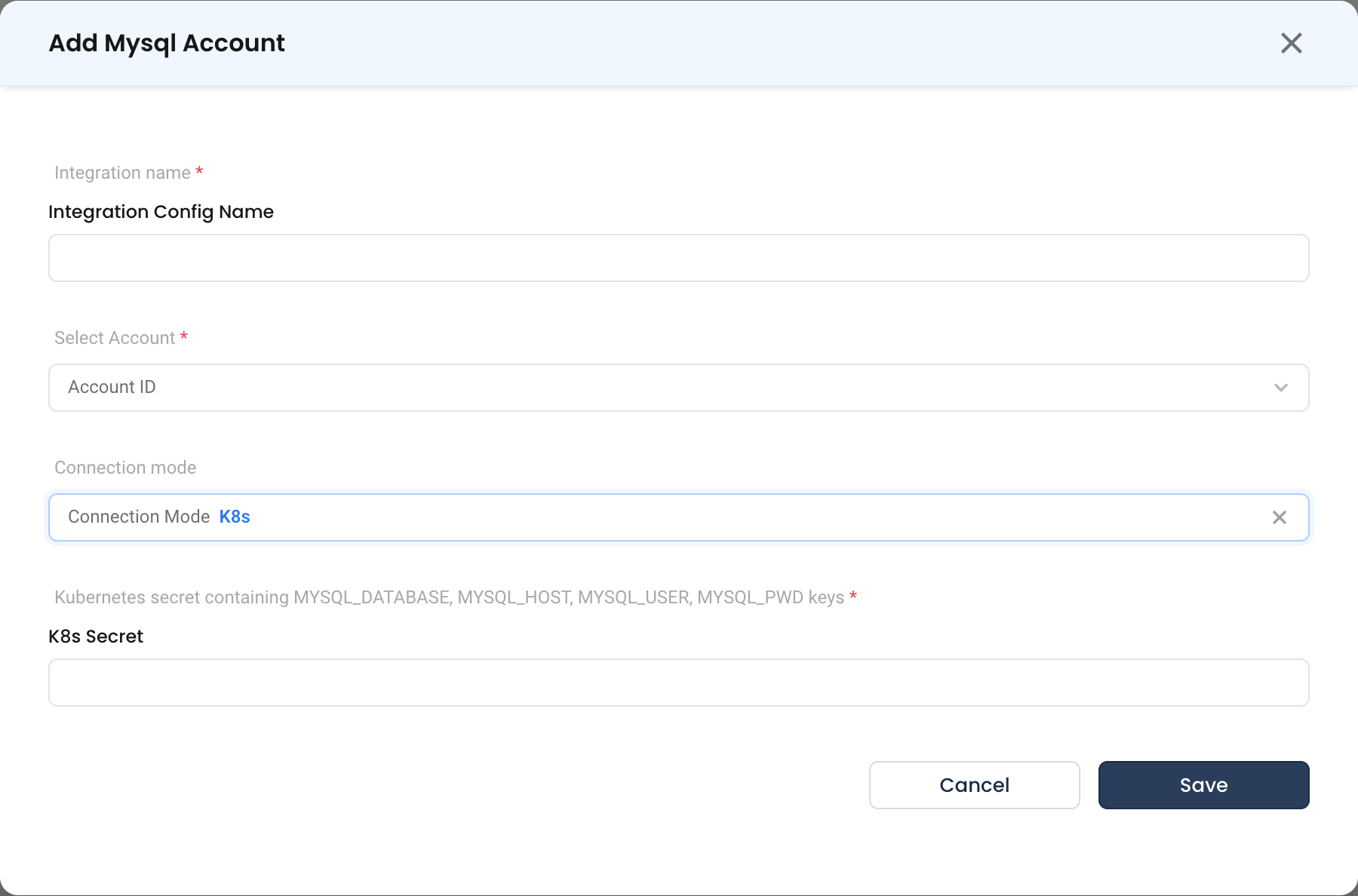
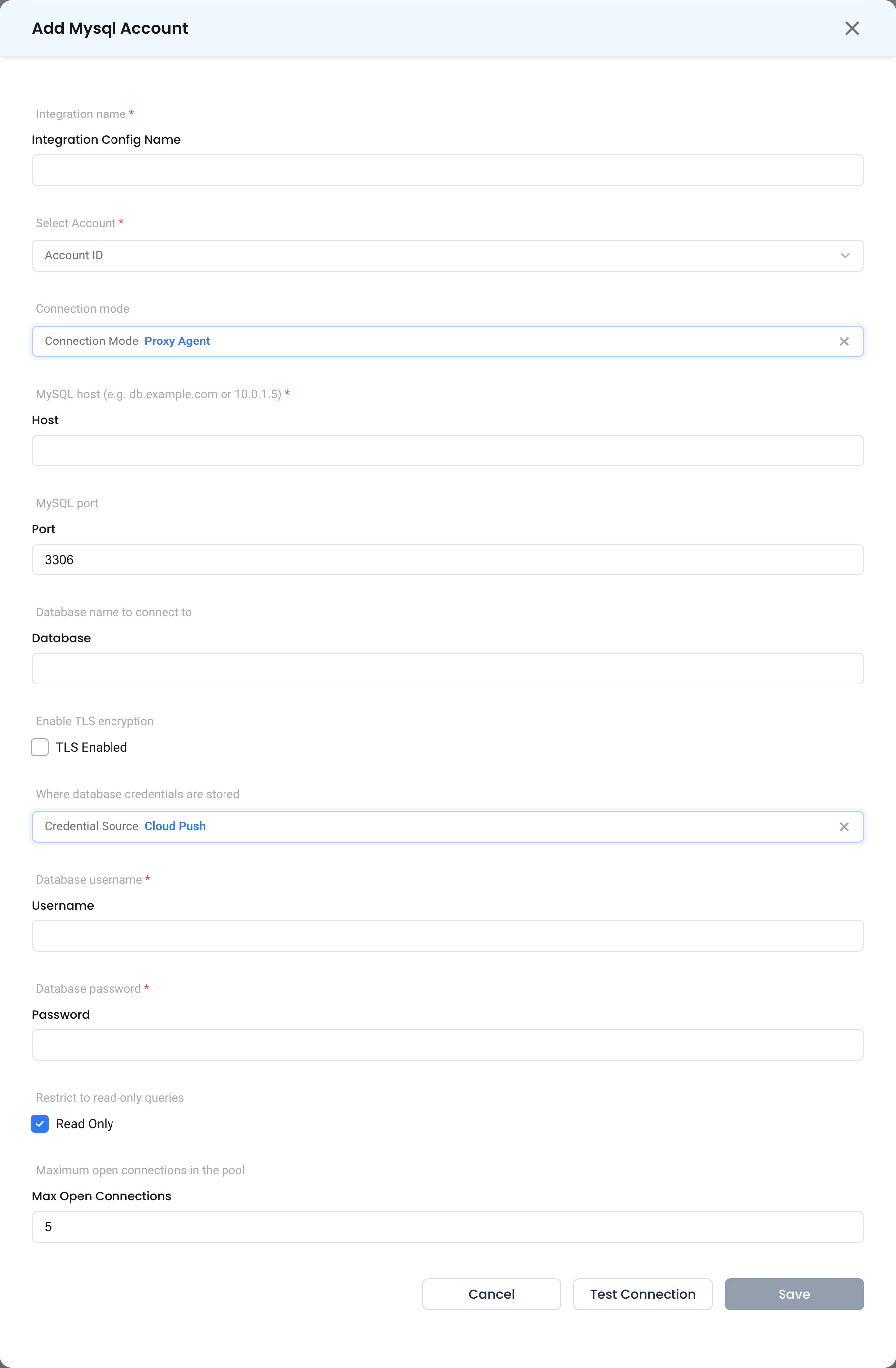
Proxy Agent
- MySQL host * (Required) — Hostname or IP, e.g.
db.example.comor10.0.1.5. - MySQL port — Typically
3306. - Database name to connect to — The schema NudgeBee opens.
- TLS Enabled — Turn on for connections crossing a network boundary.
- Credential Source, Database username *, Database password *, Read Only, Maximum open connections in the pool — see common fields.
Step 3: Save
Click Save. In Proxy Agent mode, use Test Connection first.
What Gets Connected
| Capability | What NudgeBee reads |
|---|---|
| Health check | SHOW STATUS for server counters, SHOW PROCESSLIST and information_schema.processlist for sessions and long-running queries |
| Lock and transaction state | SHOW ENGINE INNODB STATUS |
| Slow queries | Currently running statements from information_schema.processlist, filtered by execution time. MySQL analysis is point-in-time — there is no historical statement summary. |
| Workflow queries | Any SQL you supply via dbms.query with dbms_type: mysql |
Verify the Integration
- Ask NuBi to check the health of the database by the name you gave it.
- In a workflow, run a
dbms.querytask withSELECT 1.
Troubleshooting
See the shared troubleshooting table first. MySQL-specific cases:
| Symptom | Likely Cause | Fix |
|---|---|---|
| Authentication fails despite correct password | Secret uses MYSQL_PASSWORD instead of MYSQL_PWD | Recreate the secret with the MYSQL_PWD key. |
| Only NudgeBee's own session is visible | Missing PROCESS grant | GRANT PROCESS ON *.* TO 'nudgebee'@'%'; |
Host ... is not allowed to connect | The user is bound to a specific host | Create the user with a host pattern that covers the agent, e.g. 'nudgebee'@'%'. |
| No long-running queries reported, though you know some are running | They finished between polls, or PROCESS is missing so only NudgeBee's own session is listed | Confirm the PROCESS grant. MySQL analysis reads currently running statements, so a query that has already completed will not appear. |
| TLS handshake errors | Server requires TLS, TLS Enabled is off | Turn on TLS Enabled. |