Oracle Database
Connect an Oracle database so NudgeBee can analyse its health and query it from workflows.
Oracle is always reached through the Proxy Agent — there is no in-cluster secret mode.
Prerequisites
- A Proxy Agent that can reach the listener.
- An Oracle user NudgeBee can authenticate as, with
CREATE SESSIONand read access to the dynamic performance views. - The service name of the database — not the SID. For a pluggable database this is typically something like
XEPDB1orORCLPDB1.
Recommended Grants
CREATE USER nudgebee IDENTIFIED BY "<YOUR_PASSWORD>";
GRANT CREATE SESSION TO nudgebee;
GRANT SELECT_CATALOG_ROLE TO nudgebee;

-- Only if you want NudgeBee to query application data as well as diagnose the instance:
GRANT SELECT ON <app_schema>.<table> TO nudgebee;
SELECT_CATALOG_ROLE covers every dictionary view NudgeBee reads for diagnostics — V$SESSION, GV$SESSION, V$SQL, V$LOCKED_OBJECT, V$ACTIVE_SESSION_HISTORY and DBA_OBJECTS — and nothing beyond the data dictionary. It grants no access to application data.
That last point matters: SELECT_CATALOG_ROLE alone lets NudgeBee analyse sessions, locks and SQL statistics, but a question about your own tables will fail with ORA-00942. Grant SELECT explicitly on the tables you want readable. NudgeBee's schema introspection uses USER_TABLES and USER_TAB_COLUMNS, which describe the nudgebee user's own schema, so it will report an empty schema until such grants exist.
V$ACTIVE_SESSION_HISTORY is part of the Oracle Diagnostics Pack. The grant above makes it readable, but querying it on an instance without that licence is a licensing violation. Everything else NudgeBee reads is licence-free.
Step 1: Open the Configuration Form
Navigate to Admin > Integrations > Databases and select Oracle, then click Add Oracle Account.

Step 2: Fill In the Connection
- Oracle host — Hostname or IP of the listener, e.g.
db.example.comor10.0.1.5. - Oracle port — Typically
1521. - Oracle service name — The service name, e.g.
ORCLorXEPDB1. Using a SID here is the most common cause of a failed connection. - Credential Source, Database username *, Database password *, TLS Enabled, Read Only, Maximum open connections in the pool — see common fields.
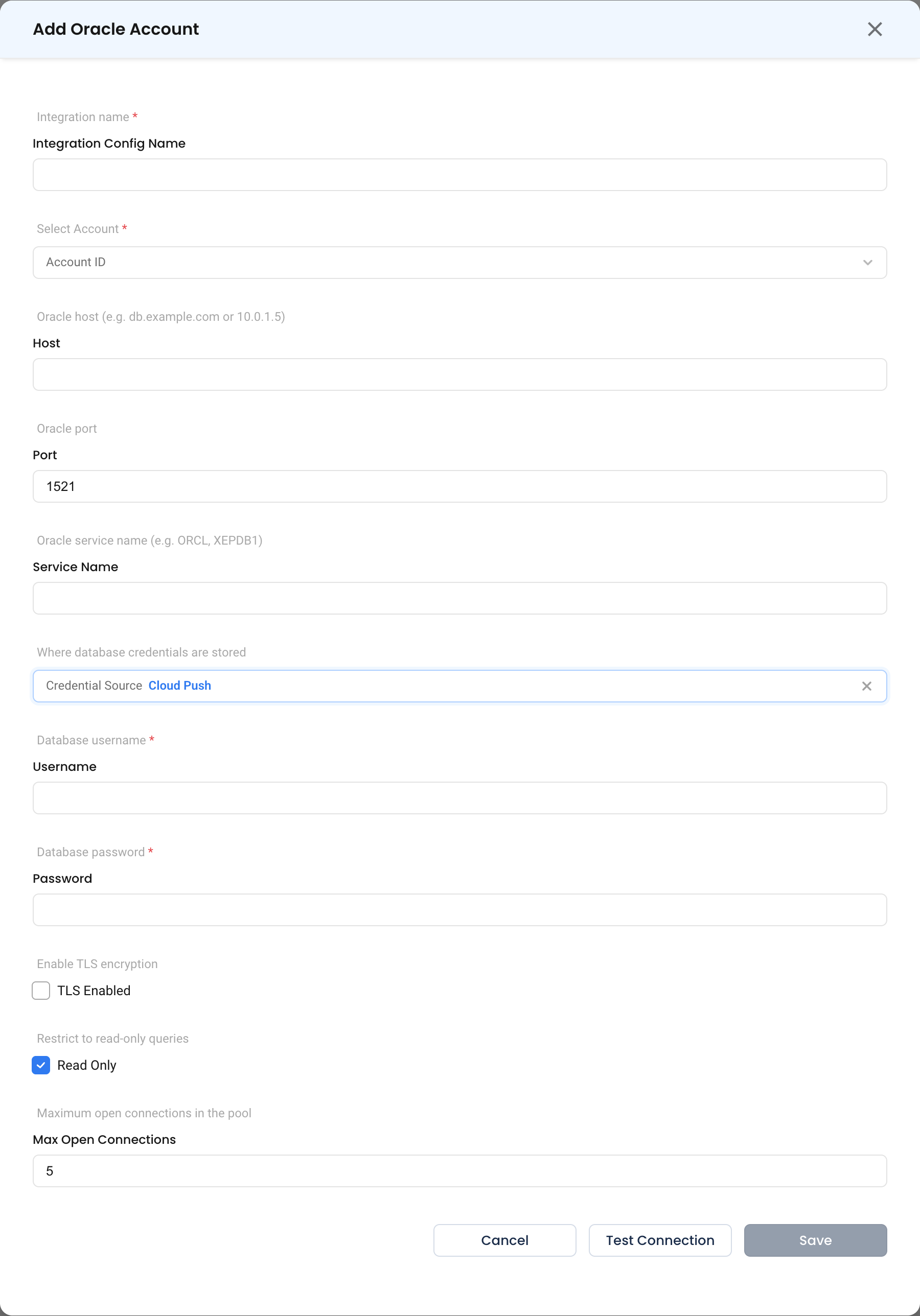
Step 3: Test and Save
Click Test Connection, then Save.
What Gets Connected
| Capability | What NudgeBee reads |
|---|---|
| Health check | V$SESSION, V$LOCK, tablespace usage and wait events |
| Slow queries | V$SQL and V$SQLSTATS |
| Workflow queries | Any SQL you supply via dbms.query with dbms_type: oracle |
Verify the Integration
- Click Test Connection on the form — it should succeed before you save.
- Ask NuBi to check the health of the database by the name you gave it.
- In a workflow, run a
dbms.querytask withSELECT 1 FROM DUAL.
Troubleshooting
See the shared troubleshooting table first. Oracle-specific cases:
| Symptom | Likely Cause | Fix |
|---|---|---|
ORA-12514: listener does not currently know of service | A SID was entered instead of a service name | Use the service name. lsnrctl services on the database host lists them. |
ORA-01017: invalid username/password | Password case, or a quoted identifier | Oracle passwords are case-sensitive by default; enter it exactly as created. |
ORA-00942: table or view does not exist on V$ views | Missing catalog access | GRANT SELECT_CATALOG_ROLE TO nudgebee; |
ORA-12541: no listener | Wrong port, or the listener is not running | Confirm the listener port and that it is reachable from the Forager host. |
ORA-28000: the account is locked | Failed login attempts locked the user | ALTER USER nudgebee ACCOUNT UNLOCK; and correct the stored password. |