PostgreSQL
Connect a PostgreSQL database so NudgeBee can run health checks, analyse slow queries and index usage, and query it from workflows. PostgreSQL is the most fully supported database in NudgeBee — NuBi's database health audit is built around it.
Supported: PostgreSQL 10 and later, including managed services such as Amazon RDS/Aurora, Cloud SQL and Azure Database for PostgreSQL.
Prerequisites
- A PostgreSQL user NudgeBee can authenticate as, with read access to the databases you want analysed.
pg_stat_statementsenabled if you want slow-query analysis. Without it, health checks still run but statement-level timing is unavailable.- Either the NudgeBee agent running in the same cluster as the database (K8s mode), or a reachable Proxy Agent (Proxy Agent mode).
Recommended Grants
CREATE ROLE nudgebee LOGIN PASSWORD '<YOUR_PASSWORD>';
GRANT CONNECT ON DATABASE <your_database> TO nudgebee;
GRANT USAGE ON SCHEMA public TO nudgebee;
GRANT SELECT ON ALL TABLES IN SCHEMA public TO nudgebee;
GRANT pg_read_all_stats TO nudgebee;
pg_read_all_stats is what lets NudgeBee read other users' query text. Without it, slow-query analysis reports timings but redacts the SQL with an insufficient privilege error.
Step 1: Open the Configuration Form
Navigate to Admin > Integrations > Databases and select Postgresql, then click Add Postgres Account.

Step 2: Choose a Connection Mode
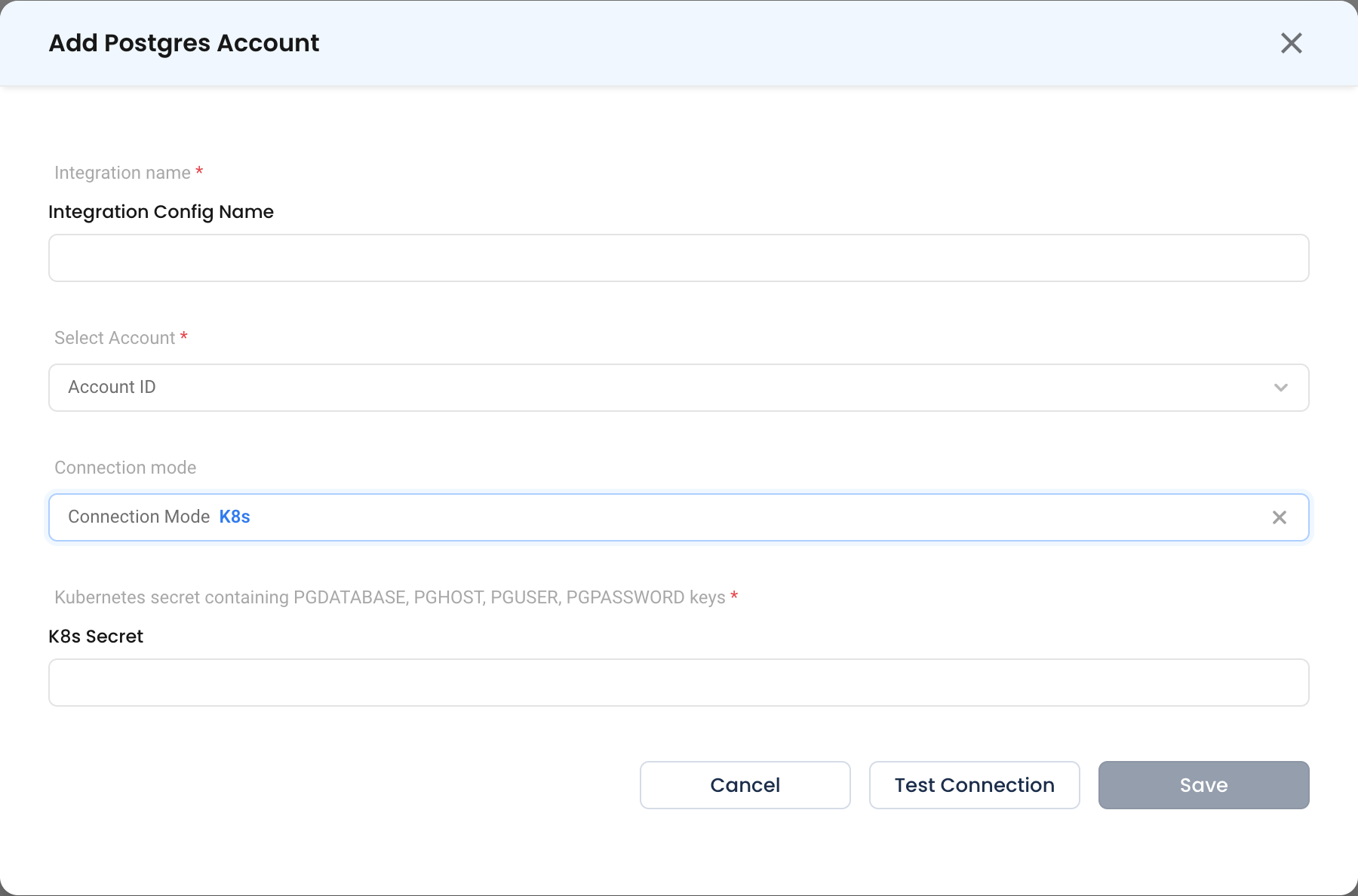
K8s
The agent connects from inside the cluster using credentials held in a Kubernetes Secret.
- Kubernetes secret containing PGDATABASE, PGHOST, PGUSER, PGPASSWORD keys * (Required)
- The name of a Secret in the cluster. It must contain all four keys:
| Key | Value |
|---|---|
PGHOST | Hostname or service DNS name, e.g. postgres.databases.svc.cluster.local |
PGDATABASE | Database to connect to |
PGUSER | Username |
PGPASSWORD | Password |
Create one with:
kubectl create secret generic nudgebee-postgres \
  --namespace databases \
  --from-literal=PGHOST=postgres.databases.svc.cluster.local \
  --from-literal=PGDATABASE=orders \
  --from-literal=PGUSER=nudgebee \
  --from-literal=PGPASSWORD='<YOUR_PASSWORD>'
Proxy Agent
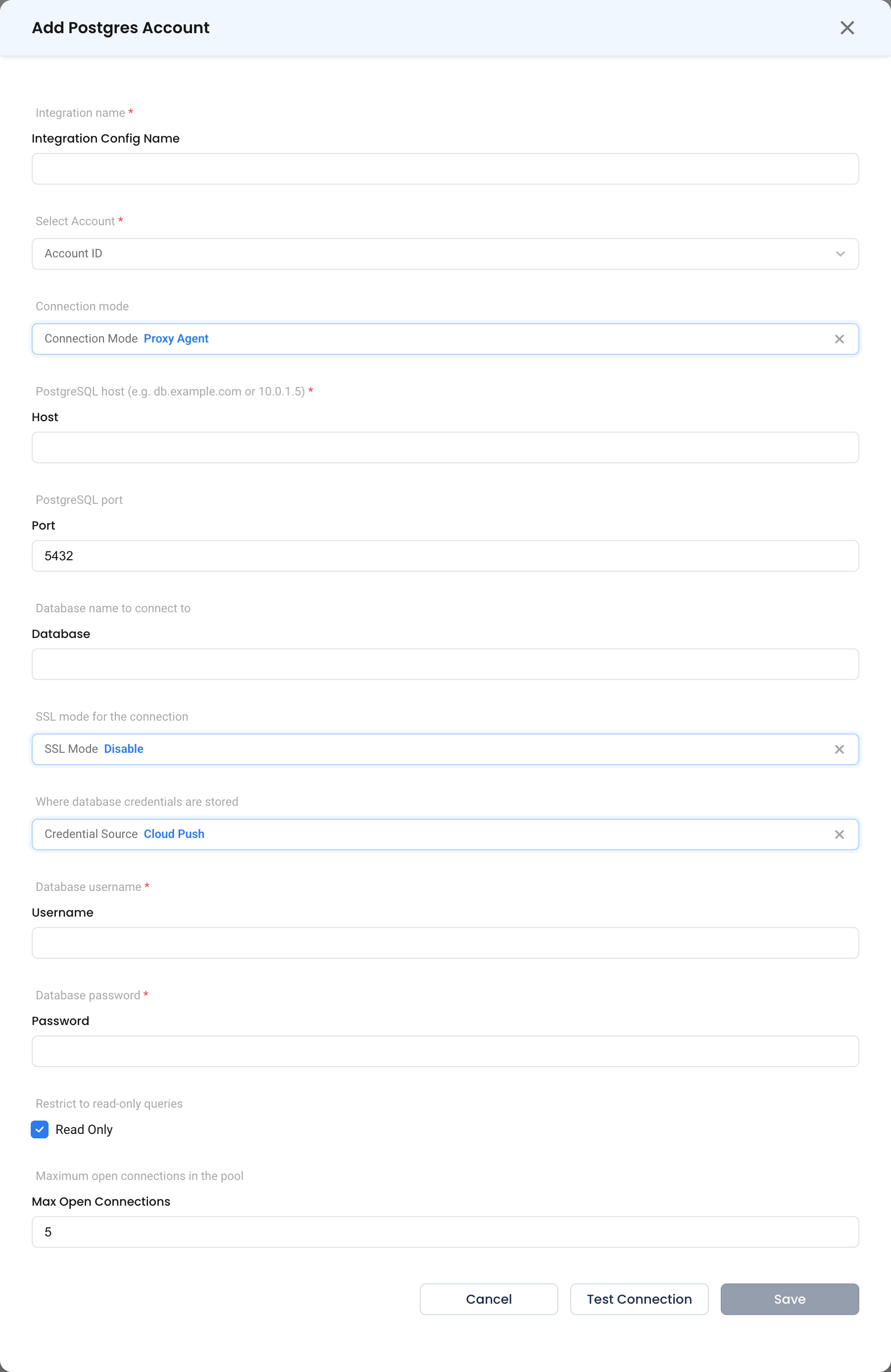
Forager connects to the database over the network. Use this for RDS, Cloud SQL, Azure Database, or any database outside a connected cluster.
- PostgreSQL host * (Required) — Hostname or IP, e.g.
db.example.comor10.0.1.5. - PostgreSQL port — Typically
5432. - Database name to connect to — The database NudgeBee opens.
- SSL Mode —
Disable(default),Require,Verify CaorVerify Full. UseRequireor stronger for anything crossing a network boundary. - Credential Source, Database username *, Database password *, Read Only, Maximum open connections in the pool — see common fields.
Step 3: Test and Save
Click Test Connection, then Save.
What Gets Connected
| Capability | What NudgeBee reads |
|---|---|
| Health check | pg_stat_activity, pg_locks, connection limits, table and index bloat statistics |
| Slow queries | pg_stat_statements — calls, total and mean execution time, statement text |
| Index usage | pg_stat_user_indexes, index sizes and scan counts |
| Workflow queries | Any SQL you supply via dbms.query with dbms_type: postgresql |
Verify the Integration
- Ask NuBi: "Can we check the health of
<integration name>?" — it should return connection counts, lock state and bloat statistics. - Ask: "Can we identify slow queries?" — if statement text is redacted, grant
pg_read_all_stats. - In a workflow, run a
dbms.querytask withSELECT 1.
Troubleshooting
See the shared troubleshooting table first. PostgreSQL-specific cases:
| Symptom | Likely Cause | Fix |
|---|---|---|
pg_stat_statements not found | The extension is not enabled | CREATE EXTENSION pg_stat_statements; and add it to shared_preload_libraries, then restart. |
Query text shows insufficient privilege | Role lacks pg_read_all_stats | GRANT pg_read_all_stats TO nudgebee; |
no pg_hba.conf entry for host | The database rejects the agent's source address | Add a pg_hba.conf rule for the agent's network, or the Forager host. |
| SSL required by server | SSL Mode set to Disable against a server that requires TLS | Set SSL Mode to Require or stronger. |
| Bloat figures look implausible | Statistics are stale | Run ANALYZE on the affected tables, then re-run the health check. |