Cloud Foundry
Connect a Cloud Foundry foundation so its applications sit alongside your Kubernetes workloads in NudgeBee. Works with Pivotal Cloud Foundry (PCF) via UAA, and with Korifi or Kubernetes-backed foundations via a service account token.
Prerequisites
- The Cloud Foundry API endpoint, e.g.
https://api.sys.example.com. - Credentials for one of the two supported authentication methods:
- Bearer Token — a Korifi or Kubernetes service account token.
- UAA OAuth2 — UAA client credentials, for PCF.
Step 1: Configure the Integration in NudgeBee
Navigate to Admin > Integrations > Kubernetes & Cloud, select Cloud Foundry, then click Add Cloud Foundry Account. The form walks through five steps.

- Account Name * (Required)
- A name for this foundation, e.g.
pcf-prod.
- A name for this foundation, e.g.
- CF API URL * (Required)
- The Cloud Foundry API endpoint, e.g.
https://api.sys.example.com.
- The Cloud Foundry API endpoint, e.g.
- Account Type
ProductionorNon-production. This drives how the foundation is treated in cost and optimization views.
- Authentication Method
- Bearer Token — for Korifi or a Kubernetes service account token.
- UAA OAuth2 — for PCF with UAA client credentials.
- Credentials
- Bearer Token * when using bearer authentication, or the UAA client id and secret when using UAA OAuth2.
- Skip SSL Verification
- Enable only for foundations presenting self-signed certificates.
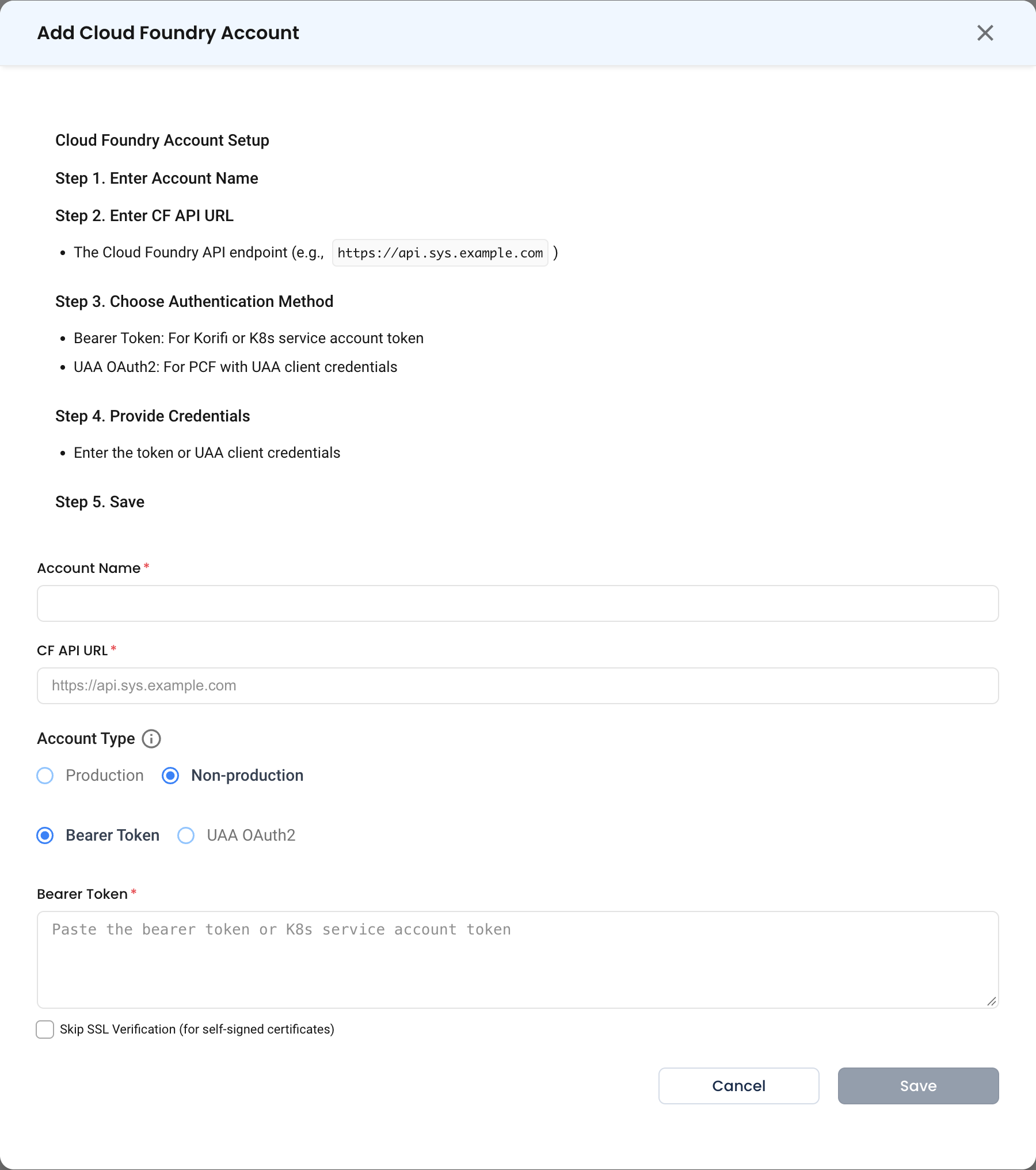
Step 2: Save
Click Save.
caution
Skip SSL Verification disables certificate checking for this connection. Prefer installing a trusted certificate on the foundation; use this only where that is genuinely not possible, and never against an endpoint reachable from the public internet.
Verify the Integration
- After saving, the account appears under Admin > Integrations > Kubernetes & Cloud as Enabled.
- Open Infra and confirm the foundation's applications appear.
Troubleshooting
| Symptom | Likely Cause | Fix |
|---|---|---|
| Certificate errors on save | Self-signed certificate on the API endpoint | Install a trusted certificate, or enable Skip SSL Verification if the endpoint is on a private network. |
401 Unauthorized with a bearer token | The token expired, or belongs to a service account without read access | Issue a fresh token for a service account that can list orgs, spaces and apps. |
401 with UAA OAuth2 | Wrong client id or secret, or the client lacks the required scopes | Confirm the UAA client credentials and that the client is authorized to read the foundation. |
| Connects but no applications appear | The identity can authenticate but cannot list spaces | Grant the account read access across the orgs and spaces you want visible. |
| Wrong API endpoint | The UI or login endpoint used instead of the API | Use the api. endpoint, not login. or the Apps Manager URL. |