Manual Declarations
The Knowledge Graph is built from what NudgeBee's collectors discover. Some things they cannot see: a service that calls another without distributed tracing, an on-prem database, a third-party API, or a resource in an account no collector reads. Manual declarations let you add those yourself, so NudgeBee can correlate alerts across them and its AI agents can reason about them like any other part of your environment.
You can declare two things:
- Dependencies — one service calls, publishes to, or subscribes to another.
- Nodes — a resource the graph does not have yet, so a dependency has something to point at.
Add them one at a time, or import many at once from a single JSON document that declares nodes and the dependencies between them together.
Where to find it
- Open Troubleshoot → Knowledge Graph.
- Click Settings at the top of the page. Only tenant admins see this button.
- Select the Manual Declarations tab.
The tab has a Nodes section and a Dependencies section, each with its own table and actions. The buttons above them add new declarations: Import JSON, Declare node and Declare dependency.
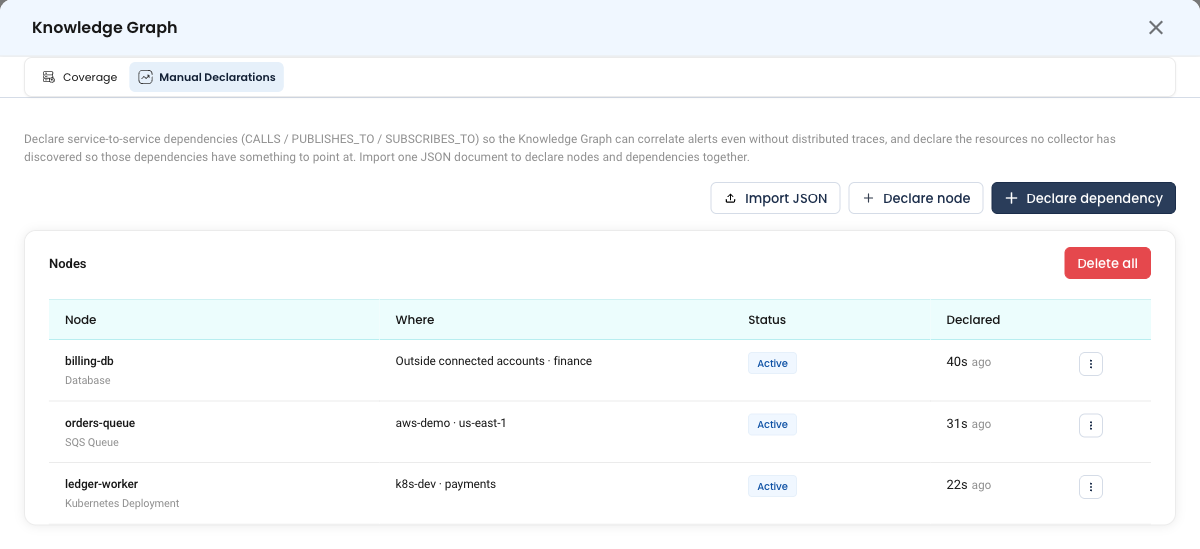 Knowledge Graph Settings → Manual Declarations
Nodes
A declared node goes into the graph as soon as you save it, so dependencies can point at it straight away. Where you declare it decides what happens later.
In a connected cloud account or Kubernetes cluster. NudgeBee gives the node exactly the identity its collector will give the same resource. When the collector later discovers it, the two become one node, and every dependency on it keeps working. This is why some fields are required: they are the fields that identity is built from.
| Where | Required fields |
|---|---|
| AWS, GCP or Azure account | Resource type, name and region. For an AWS EC2 instance or load balancer, also the VPC it is in. For an RDS instance or cluster, or a Redshift cluster, give the VPC if it is in one. |
| Kubernetes cluster | Resource type (Deployment, StatefulSet, DaemonSet, CronJob or Service), name and namespace |
Outside any connected account. Use this for an on-prem database, a SaaS API, or anything else no collector will ever read. Pick a node type (for example Database, Cache, MessageQueue or ExternalService) and a name. A namespace is optional and works as a grouping, such as a team or environment. These nodes never merge with a collected one.
A node outside any account can also use a kind of your own, such as NetworkSwitch. A tenant admin introduces a new kind the first time it is used.
Optional details depend on the resource type, for example a database's engine. Fields only the collector can know, such as timestamps, runtime state, allocated IPs and internal ids, cannot be declared.
Node statuses
| Status | What it means | What to do |
|---|---|---|
| Active | Declared by hand. It stays in the graph until you delete it or a collector discovers it. | Nothing. |
| Adopted | A collector now provides this node. It is the same node, so dependencies on it are unchanged. The details you typed were replaced by the collected data. | Nothing. You can delete the declaration; the node stays. |
| Possible duplicate | A collected node with the same type and name exists under a different identity, for example because the VPC you gave was not the one the resource is in. | Choose Merge into collected node from the row's menu. Dependencies move to the collected node and the declaration is removed. |
A node's identity fields cannot be edited after it is declared, because changing them would make it a different node. To change one, delete the node and declare it again. An Adopted node cannot be edited at all; the collector owns its details.
Dependencies
A dependency names a source, a destination and how they relate:
| Relationship | Use it when |
|---|---|
CALLS | The source sends requests to the destination (HTTP, gRPC, a database query). The default. |
PUBLISHES_TO | The source writes messages to a queue or topic. |
SUBSCRIBES_TO | The source reads messages from a queue or topic. |
These three link any two nodes. When one end is a node declared outside any account, six more are available:
| Relationship | Use it when |
|---|---|
RUNS_ON, HOSTED_ON, DEPENDS_ON, ROUTES_TO | The source depends on the destination, for example a VM that runs on a host or traffic that routes through a load balancer. |
CONNECTED_TO | The two are linked with no direction, such as a cable between a server and a network switch. |
BELONGS_TO | The source is grouped under the destination. |
NudgeBee finds each side in the graph by its type and name, narrowed by any namespace, cluster, ARN or account you give. The Status column shows how that went:
| Status | Meaning |
|---|---|
| Resolved | Both sides matched exactly one node. The edge appears in the graph after the next rebuild, which runs hourly. |
| Source unmatched / Dest unmatched | No node matched that side yet. Choose Declare source node or Declare destination node from the row's menu to add it, prefilled from the dependency. |
| Source ambiguous / Dest ambiguous | Several nodes matched. Choose Resolve from the row's menu and pick the right one. |
| Source: too many / Dest: too many | More than ten nodes matched. Edit the dependency and add a namespace, cluster, ARN or account to narrow it. |
| Pending | Not resolved yet. |
| Node inactive | A node it pointed at is no longer in the graph. |
| Invalid payload | The declaration can't be read. Edit it. |
Re-resolve on a row, or Re-resolve all, matches again. That is useful once a missing resource has been collected.
Declaring one at a time
- Declare node opens a form. Choose where the resource lives, then its type. The form shows the required fields for that type and lists its optional details.
- Declare dependency opens a form with a Source and a Destination column. Each side takes a node type and name, plus optional qualifiers.
Importing a JSON document
Use an import to declare many things at once, or to keep your declarations in a file under version control.
- Click Import JSON.
- Paste the document into the editor, or click Upload file to load a
.jsonfile. - Click Import.
To start from something that already fits your environment, click the download icon next to Sample for your accounts. The sample uses your connected accounts and their types. View format shows the structure and the type values your accounts accept.
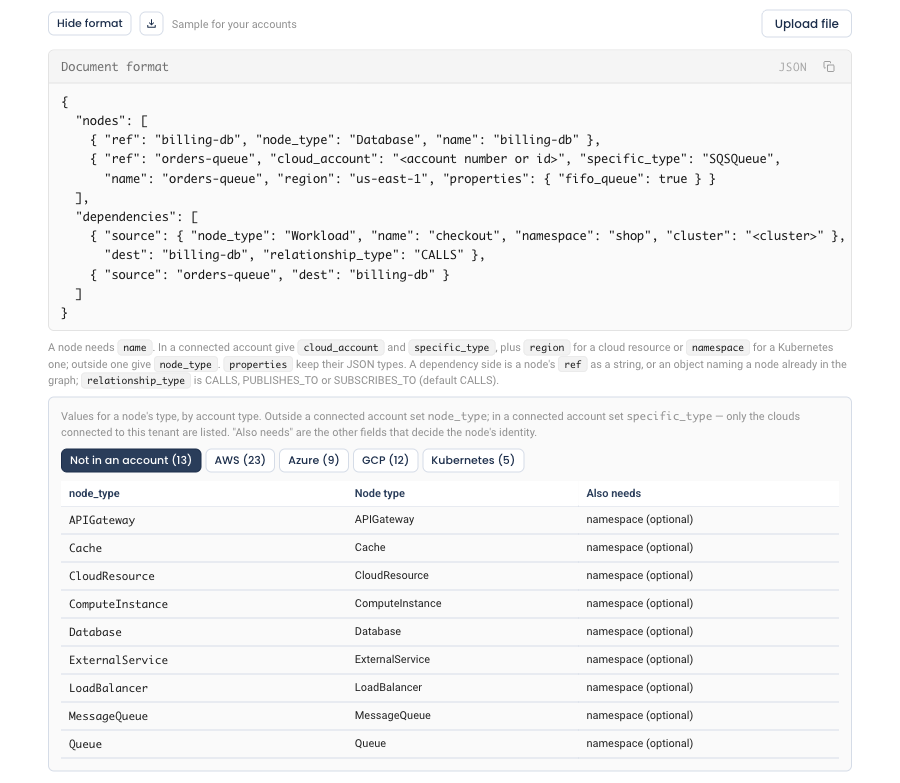 View format lists the type values your connected accounts accept
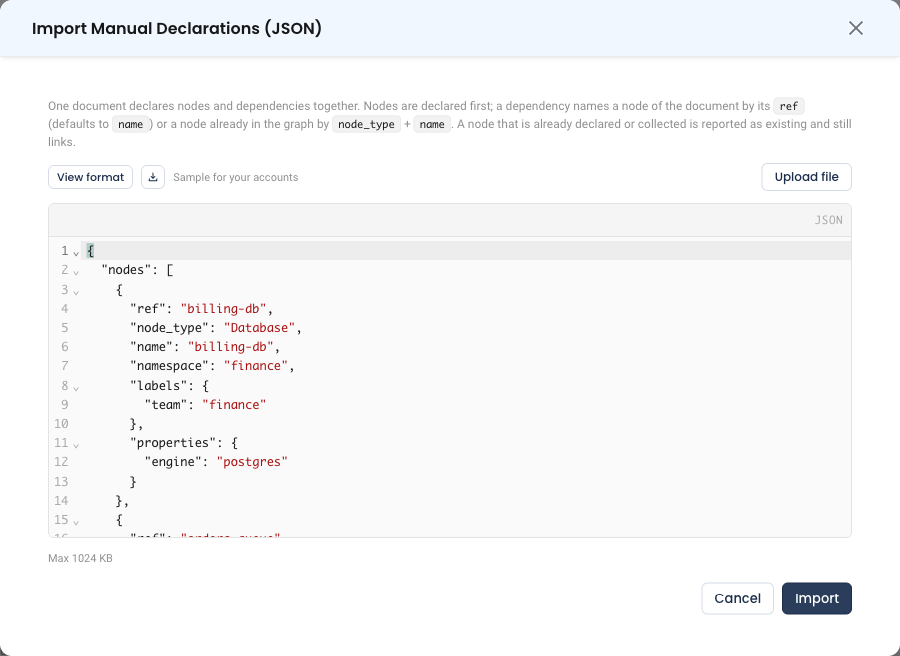 Paste or upload a document, then click Import
Document format
A document has two lists, nodes and dependencies. Either may be left out, but not both.
{
  "nodes": [
    {
      "ref": "billing-db",
      "node_type": "Database",
      "name": "billing-db",
      "namespace": "finance",
      "labels": { "team": "finance" },
      "properties": { "engine": "postgres" }
    },
    {
      "ref": "orders-queue",
      "cloud_account": "123456789012",
      "specific_type": "SQSQueue",
      "name": "orders-queue",
      "region": "us-east-1"
    },
    {
      "ref": "ledger-worker",
      "cloud_account": "<kubernetes account id>",
      "specific_type": "KubernetesDeployment",
      "name": "ledger-worker",
      "namespace": "payments",
      "properties": { "replicas": 3, "annotations": { "owner": "ledger-team" } }
    }
  ],
  "dependencies": [
    { "source": "ledger-worker", "dest": "billing-db", "relationship_type": "CALLS" },
    { "source": "ledger-worker", "dest": "orders-queue", "relationship_type": "PUBLISHES_TO" },
    {
      "source": { "node_type": "Workload", "name": "checkout", "namespace": "shop", "cluster": "prod-cluster" },
      "dest": "billing-db"
    }
  ]
}
Node fields
| Field | Type | Required | Description |
|---|---|---|---|
ref | string | No | How dependencies in this document refer to the node. Defaults to name. Must be unique in the document. |
name | string | Yes | The resource name, as the cloud console or cluster shows it. |
cloud_account | string | In an account | The connected account, by its provider account number (AWS account, GCP project, Azure subscription) or its NudgeBee account id. Kubernetes clusters have no account number, so use the id. Leave it out for a node outside any account. |
specific_type | string | In an account | The resource type, for example SQSQueue, RDSInstance or KubernetesDeployment. View format lists the values for your accounts. |
node_type | string | Outside an account | The node type, for example Database, Cache, MessageQueue or ExternalService. |
region | string | For a cloud resource | For example us-east-1. |
namespace | string | For a Kubernetes resource | Optional grouping for a node outside any account. |
network | string | Some AWS types | The VPC the resource is in, by its vpc-… id or its name as the graph shows it. |
description | string | No | What it is and who owns it. |
labels | object | No | Text keys and text values, at most 50. |
properties | object | No | Optional details of the type. Values keep their JSON types: numbers, booleans, objects for key/value details such as annotations, and arrays for lists such as subnet_ids. |
Dependency fields
| Field | Type | Required | Description |
|---|---|---|---|
source | string or object | Yes | A string is the ref of a node in this document. An object names a node already in the graph (fields below). |
dest | string or object | Yes | Same as source. |
relationship_type | string | No | CALLS (default), PUBLISHES_TO or SUBSCRIBES_TO. With a node declared outside any account at one end, also CONNECTED_TO, DEPENDS_ON, RUNS_ON, HOSTED_ON, ROUTES_TO or BELONGS_TO. |
notes | string | No | Free text shown with the declaration. |
A side written as an object takes these fields:
| Field | Required | Description |
|---|---|---|
node_type | Yes | For example Workload, K8sService, Database, MessageQueue. |
name | Yes | The node's name. |
namespace | No | Kubernetes namespace. |
cluster | No | Kubernetes cluster name. |
arn | No | Resource ARN. When given, it is matched instead of the name. |
account_id | No | The account the node is in, by provider account number or NudgeBee account id. |
A side that refers to a node of the document is linked to that exact node, even when another node with the same type and name exists.
What the result shows
Nodes are declared first, in order, then dependencies. Each item comes back with its outcome:
| Outcome | Applies to | Meaning |
|---|---|---|
| Created | Nodes and dependencies | Declared. A dependency also shows its resolution status. |
| Existing | Nodes and dependencies | Already declared, or for a node already collected. A node shows the node it matched, and dependencies in the document that refer to it still link to it. Nothing is written again. |
| Rejected | Nodes and dependencies | Not declared, with the reason, such as region is required. A dependency on a rejected node is rejected too. |
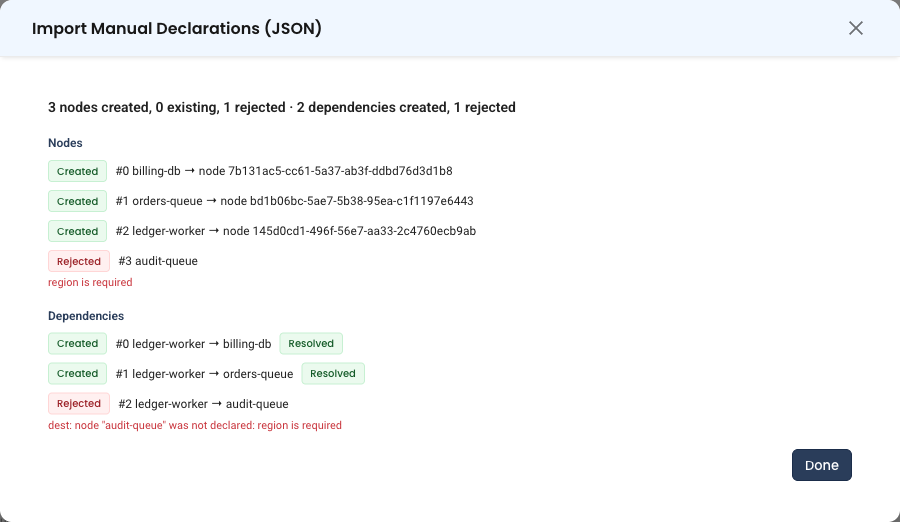 Every item is reported, with the reason for anything that was not declared
Click Done and both sections show what was added.
Nodes and dependencies that already exist come back as Existing. Nothing is duplicated, so you can keep a declarations file in version control and import it again after editing it.
When a whole document is refused
These problems refuse the document before anything is written:
- It is not valid JSON, it is larger than 1 MB, or it declares more than 500 nodes and dependencies together. Split a larger set across several documents.
- It has a field the format does not define, such as a misspelled
nmae. - It declares nothing.
- Two nodes use the same
ref. - A dependency refers to a
refthat no node in the document has.
The message names the item at fault, for example nodes[1]: ref "billing-db" is already used by nodes[0].
Permissions
| Role | Can do |
|---|---|
| Tenant admin | Everything, including nodes outside any connected account and Delete all. |
| Account admin | Declare, edit and delete nodes and dependencies in the accounts they administer. A dependency that touches another account, or a node outside any account, is refused. |
The Settings button is shown to tenant admins only, so an account admin works through the API. An account admin's import declares what they may write and rejects the rest, item by item.
Removing declarations
- Delete on a node removes it from the graph together with its edges, and dependencies that pointed at it become unmatched. For an adopted node, only the declaration is removed; the node belongs to the collector.
- Delete on a dependency removes the declaration and its edge.
- Delete all in either section removes every declaration of that kind for the tenant. Tenant admins only.
Related
- Semantic Knowledge Graph
- Where the Data Comes From — what the collectors and flow sources already see
- Nodes and Relationships
- How NudgeBee Uses the Graph
- API Docs —
kg_create_manual_declarationsand the otherkg_*_manual_*actions