Action: Create Ticket Action
Add this action in the Automation builder: click Add Action, search for it, and configure its parameters.
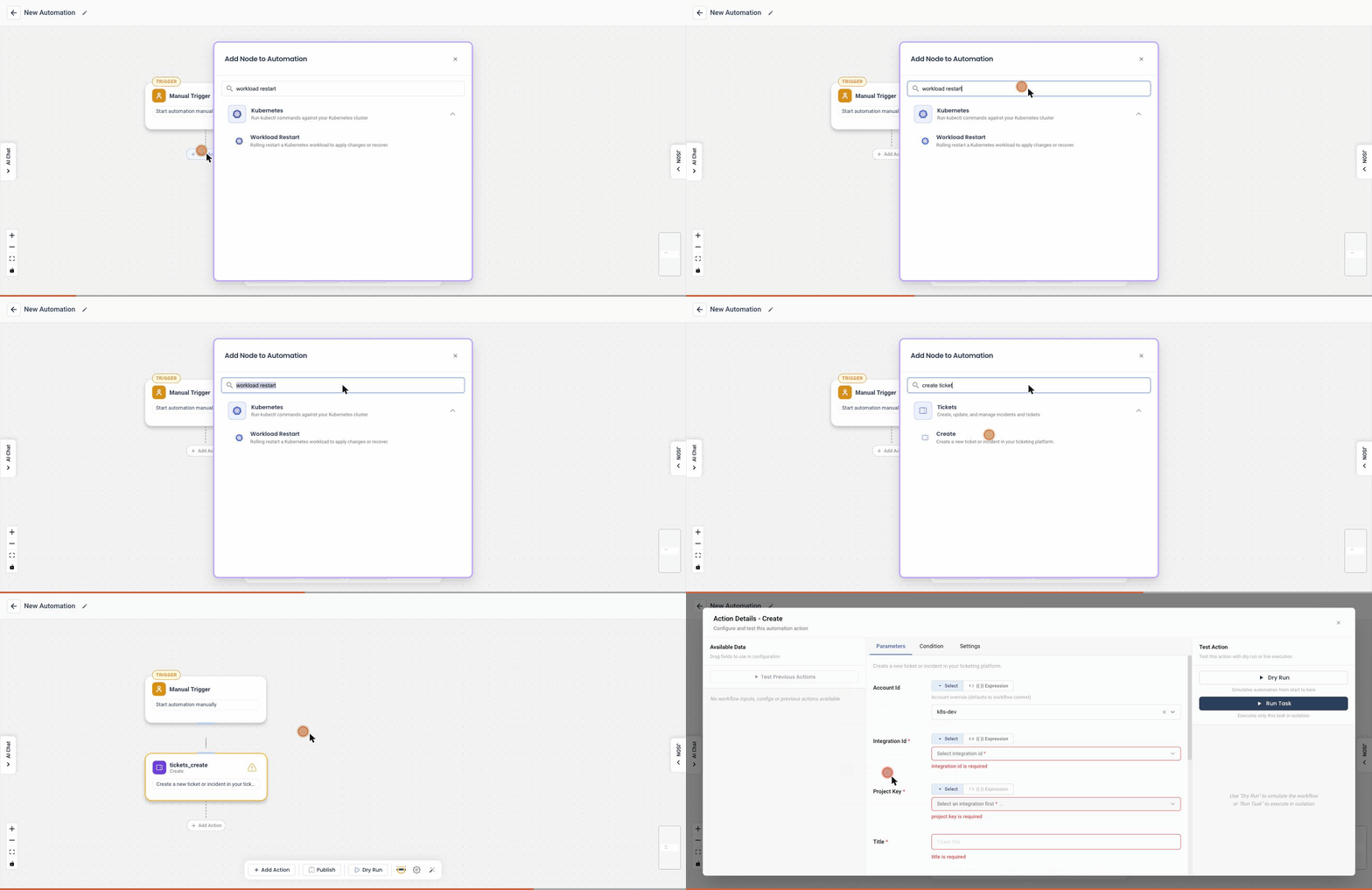
Overview
The Create Ticket action allows users to create tickets for integrations like Jira or GitHub Issues based on a predefined template. This action helps in automating the process of ticket creation for resource monitoring and issue tracking.
User Inputs
- Ticket Description: Enter the ticket description using a template.
- Select Project: Choose the project for the ticket.
- Select Priority: Set the priority of the ticket.
- Select Project Config: Provide additional project configuration.
- Enter Assignee Email: Specify the assignee's email.
Template Variables
You can use the following variables in your ticket description template:
trigger_type: Type of trigger used in the runbook.applicable_resources: Resources on which the runbook operated.notify_time: Time when the operation was performed.trigger_condition: Context of the trigger.runbook_name: Name of the executed runbook.runbook_link: Link to the runbook.
Example Template
*Title*: Auto Runbook generated ticket for Resource
*Trigger Type*: {{ trigger_type }}
*Trigger Condition*: {{ trigger_condition }}
*Resources*: {{ applicable_resources }}
*Notify Time*: {{ notify_time }}
*Runbook Name*: {{ runbook_name }}
*Runbook Link*: {{ runbook_link }}
Detailed Explanation
Ticket Description
- Enter a detailed description for the ticket. You can use the provided variables to dynamically insert relevant information into the template.
Select Project
- Choose the project where the ticket will be created. This helps in organizing the tickets appropriately.
Select Priority
- Set the priority of the ticket. This helps in prioritizing the issues based on their severity and impact.
Select Project Config
- Provide any additional configuration specific to the project. This can include custom fields or settings required for ticket creation.
Enter Assignee Email
- Specify the email of the person to whom the ticket will be assigned. This ensures that the right person is notified and can take action on the issue.
Supported Integrations
- Jira: Create tickets in Jira with all the specified details.
- GitHub Issues: Create issues in GitHub repositories with the provided information.
Usage
- Define the Ticket Template: Use the provided variables to create a meaningful ticket template.
- Fill in the Details: Enter the project, priority, assignee email, and any additional configuration.
- Create the Ticket: The tool will automatically create a ticket in the specified integration with the details provided.
This action helps streamline the process of issue tracking and management by automating ticket creation based on predefined templates and contextual information.