Action: Terminate Node Gracefully
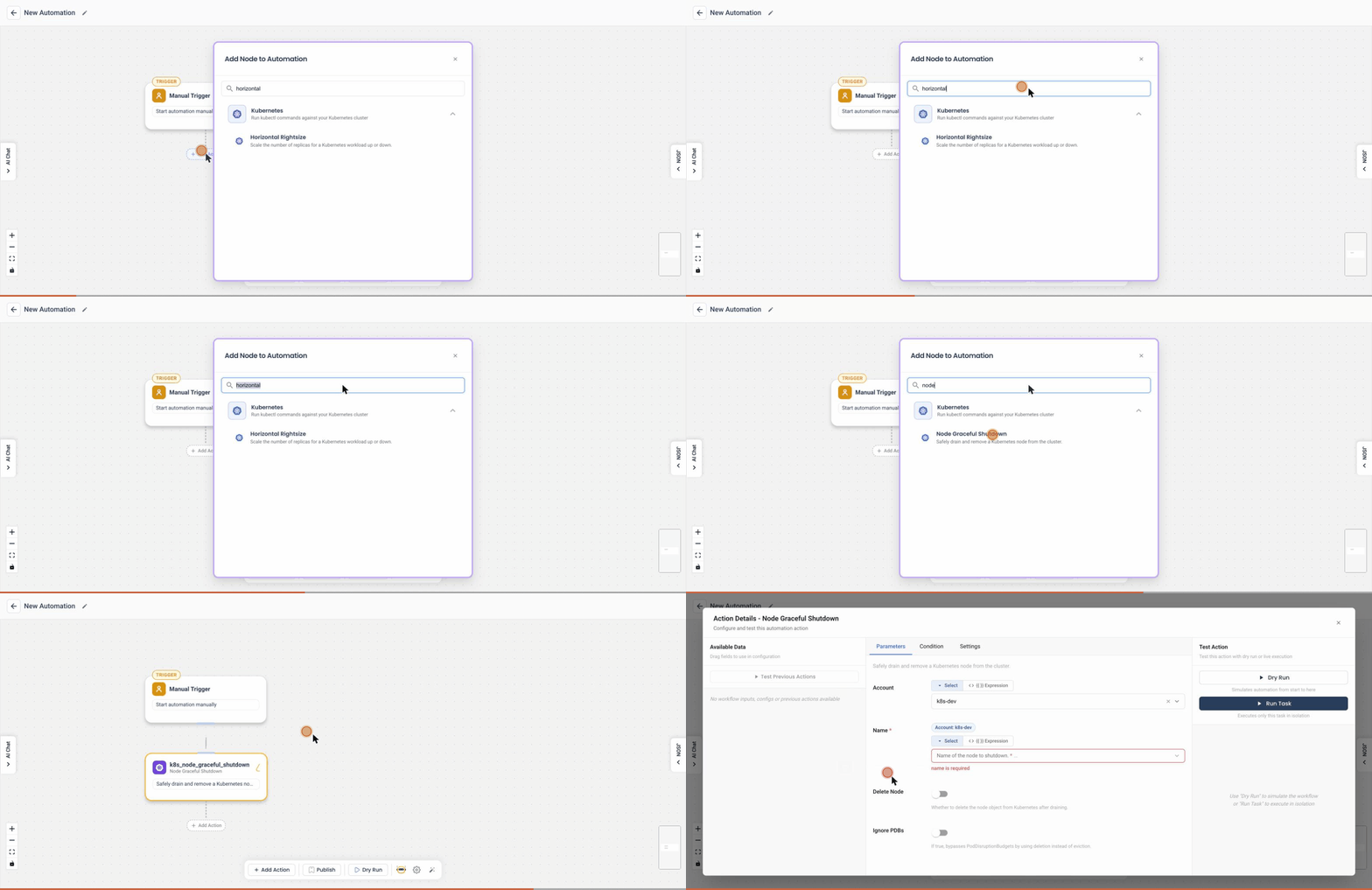
Add this action in the Automation builder: click Add Action, search for it, and configure its parameters.
Overview
The Terminate Node Gracefully action allows users to safely shut down a Kubernetes node as part of an automated workflow. This action is particularly useful in scenarios such as cluster scaling, maintenance, or draining underutilized nodes.
The action ensures minimal disruption to workloads by offering options to control how the termination should proceed, including pod eviction and node deletion.
User Inputs
| Option | Description |
|---|---|
| Disable Eviction | If enabled, the node is terminated without attempting to evict the pods. Otherwise, the default behavior is to evict the pods gracefully before shutting down the node. |
| Delete Node | If enabled, the node object is deleted from the Kubernetes cluster after termination. This is useful for permanent removal of the node from the cluster inventory. |
Detailed Explanation
When this action is triggered:
-
Graceful Termination:
- By default, the node is cordoned and pods are evicted to other nodes before it is shut down.
- This ensures workloads continue running with minimal interruption.
-
Disable Eviction (Optional):
- If selected, the eviction process is skipped and the node is shut down immediately.
- This may result in pod termination if no replicas are available elsewhere.
-
Delete Node (Optional):
- When checked, the node is removed from the Kubernetes API after shutdown.
- Useful for permanent decommissioning of nodes, especially in cloud environments where the infrastructure is also being torn down.
Example Use Case
Consider a use case where an organization wants to shut down underutilized nodes during off-peak hours to save costs. They can configure an automated workflow using this action to gracefully terminate such nodes and optionally remove them from the cluster. If the nodes are expected to return (e.g., via autoscaling), the Delete Node option can be left unchecked.
Notes
- Ensure that workloads running on the node have sufficient replicas on other nodes for a smooth eviction process.
- If Disable Eviction is selected, prepare for potential pod disruption or data loss.
- If the underlying infrastructure provider supports autoscaling or VM deletion, coordinate this action with the infrastructure layer to avoid orphaned nodes.